
Target CPA Google Ads: Maximize Conversions & Minimize Costs
Google Ads are designed to drive actions. These actions are also called conversions and include things like product purchases, event registrations, and email signups.
It's these actions you're ultimately vying for when you bid on the keywords that trigger your ad to display. By setting a target cost per action (CPA), you inform Google Ads of how much you're willing to pay each time your ad successfully drives a designated outcome.
What Is Target CPA in Google Ads?
Target CPA is a Google Ads feature that enables automated bidding. Advertisers use it to set a desired average cost they are willing to pay per conversion.
When you use Target CPA, Google Ads employs machine learning to forecast the performance of your ads. It predicts which clicks are likely to lead to conversions and adjusts bids accordingly to capture those particular clicks. In doing so, it helps maximize the number of conversions you receive for your specified budget. And hit your target CPA.
This approach is rooted in data. It considers your campaign's historical performance and factors like time, location, and device.
Why does this matter?
Target CPA helps prevent overspending. And spending without a good return. The feature helps your campaigns become more efficient. Prioritizing funds where they count and saving where they don’t.
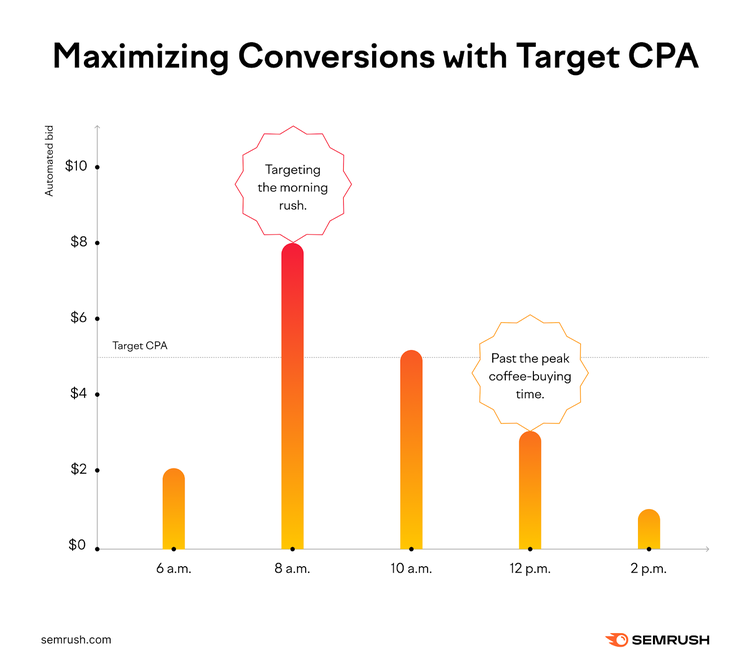
Consider a local coffee shop that sets a $5 target CPA for their new seasonal blend promotion. Google Ads might increase bids in the morning, when potential customers are on the hunt for their first cup. Especially in areas close to the shop's location. It might lower bids in the afternoon. Or in regions far from the shop.
Advantages of Google Ads Target CPA
Target CPA in Google Ads has a few major advantages:
1. Efficient Budget Allocation
You give Google your desired ad budget. It will get close to that spend and avoid going over all while using contextual signals like past conversions, location, and time of day, to decide the best individual bids for your target cost per action.
Recall our local coffee shop example. Two factors resulted in higher budget allocation: Morning hours and device proximity to the coffee shop. The inverse factors (later time of day, further distance from the local shop) resulted in lower budget allocation.
Basically, Target CPA helps ensure your spend is efficient.
2. Better Campaign Metrics
Successful target CPA bidding can impact some key campaign metrics:
- Click-through rate (CTR): Because Target CPA bids competitively for traffic likely to convert, the ratio of clicks on your ad should be high
- Conversions: Naturally, more competitive bids can mean better conversion figures
- Average CPA: Target CPA instructs Google Ads to optimize bids based on the cost per action. You can decrease or increase your average CPA accordingly based on the goals for your campaign.
- Return on Ad Spend (ROAS): With optimized traffic for your allocated budget, the overall profitability of your campaign should go up
Positive movement in these metrics should also reflect a better overall return on investment (ROI).
3. Improved Market Adaptability with Automated Optimization
Because Google uses advanced algorithms and real-time data to refine its bidding strategies, you also gain a measure of market adaptability.
Say there’s a sudden increase in searches or purchases for a product like "retro hoodies." Google may recognize this trend and automatically boost relevant bids. All without you having to monitor a thing.
With Target CPA, your bids are being adjusted automatically based on market trends.
How to Set a Target CPA in Google Ads
First, a prerequisite. To kick off Target CPA bidding, you need to enable conversion tracking.
This supplies Google Ads with the data it will use to forecast and optimize your Target CPA bids. Before you can use Target CPA effectively, your ad needs at least 15 tracked conversions in the last 30 days.
Calculate Your Target CPA
Before you can set up a Target CPA campaign, you have to decide what your target CPA should be.
Wondering how to calculate a target CPA for Google Ads?
Let the performance of your existing ad campaign (with manual bids), inform where you start with your Target CPA settings in Google Ads.
Your current cost per action is easy to calculate. It’s the total campaign spend divided by the number of customers who took the desired action.
Cost per action = Total campaign spend / Number of customers acquired
Your existing CPA provides a good jumping off point. Next, factor in the amount you can spend while still remaining profitable.
Consider:
- Your profit per sale: Calculate how much it costs, on average, to get your product into the hands of your buyer. Include things like manufacturing, employee costs, shipping, taxes, and fees. Then, subtract that total from your sale price. This is your average profit per sale.
Profit per sale = Sale price - Total cost to deliver product
- Your conversion rate: This is the percentage of people who ultimately make a purchase, out of the number of people who took the action you intend to target with your ad. Like completing a form fill.
Conversion rate = Number of people who purchased / Number of people who took initial desired action
With these two data points, you can calculate your maximum allowable CPA (max CPA). Simply multiply your profit per sale by your conversion rate.
Maximum allowable CPA = Profit per sale x Conversion rate
For instance, if each sale brings in $30 (profit per sale) and 5% of people who do the defined action in your ad go on to purchase (conversion rate), your max CPA is $1.50.
Maximum allowable CPA: $30 × 0.05 = $1.50
Notice: Using your max CPA to bid only ensures you break even.
To increase profitability, set a target CPA based on your desired profit margin. Choose a target profit margin percentage (e.g., 25%). Subtract that number from 1 and multiply it by your max CPA to determine your target CPA.
Target CPA: $1.50 × 0.75 = $1.13
This approach helps set an initial target CPA that aligns with your profitability goals and your conversion efficiency.
Consider Consulting Competitor Data
Even if you can use a lot of your own internal data to calculate your initial target CPA, it still pays to check market and competitor information.
There’s a lot of historical data to gain by using tools complementary to Google Ads. For instance, you can use Advertising Research from Semrush to get a snapshot of your competitor space.
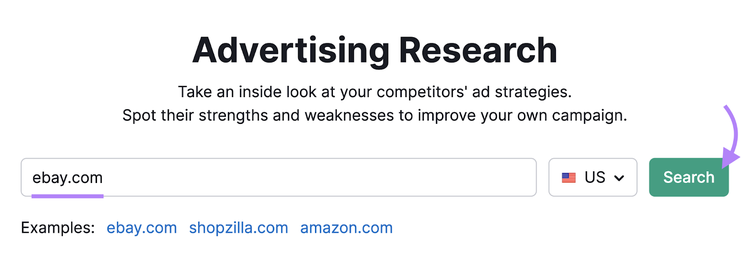
Enter a competitor's web address into the search bar and click “Search.”
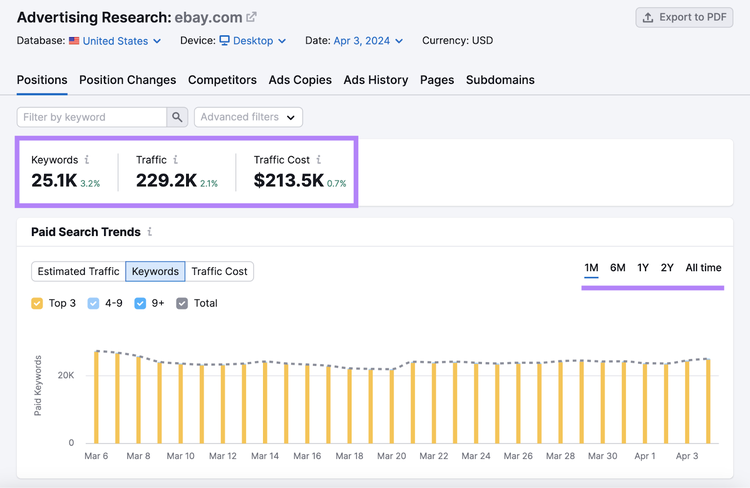
In the “Positions” tab, you get a consolidated view of the competitor’s keyword volume, traffic, and costs.
Click the “1M,” “6M,” “1Y,” “2Y,” and “All time” options in the upper right of the “Paid Search Trends” box to adjust for the time period you prefer.
Do the same for other competitors.
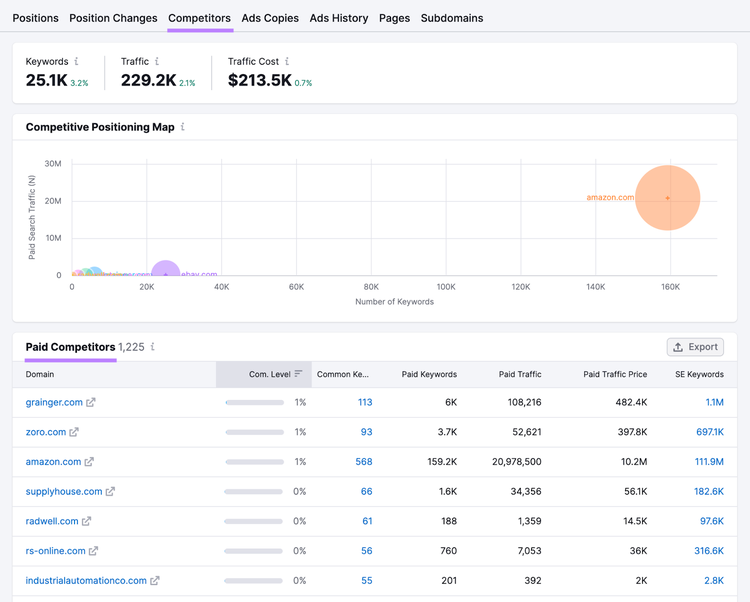
Not sure which competitors to look at? See recommendations from Semrush by visiting the “Competitors” tab.
This is a data-driven way to discover competitors you may not have considered.
Use the “Paid Search Positions” table (in the “Positions” tab) for more granular insights. The table shows competitors’ actual keywords, landing pages (“URL” column), and other valuable keyword performance data.
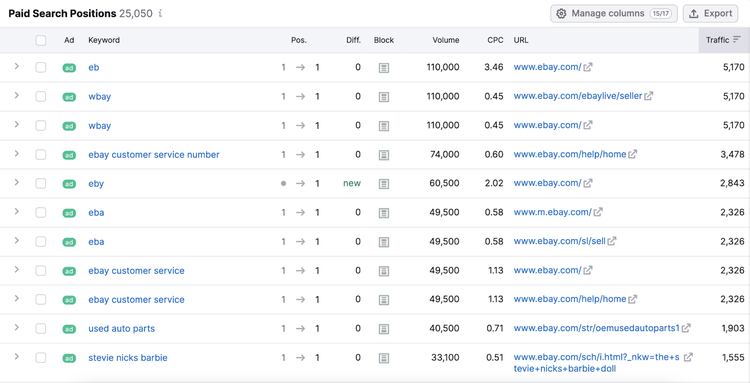
Use the data points from these reports to compare the traffic cost of relevant keywords to estimated traffic volume achieved. You’ll get an idea of their market value. Then, you can check how aggressively others are bidding on those very keywords to understand how much you need to spend to compete.
Further reading: What Is a Competitive Analysis & How to Do It (With Template)
Analyze Competitors’ Ads
with the Advertising Research Tool
Finally, Set Your Target CPA in Google Ads
Setting your initial Target CPA in Google Ads is straightforward. Here's what to do:
- Sign in to your Google Ads account
- Click the “Campaigns” icon (on the left nav bar). Then select “Campaigns” from the drop-down menu.
- Choose the campaign you want to edit by clicking its name
- Input your target CPA as you’ve calculated in the above sections
- Click 'Save' to apply the changes
Note
This is applicable for Google Ads’ new user interface design. If you’re using an older version, Google recommends using their Quick reference map. Or using the search bar to get to the Target CPA settings.
Solutions to Common Target CPA Bidding Challenges
Prepare to face some common pitfalls. These challenges can be recurring.
The good news is the more of these situations you fix, the better you get at handling them in the future.
Variable Performance Data
Google Ads relies on consistent data to make smart decisions. Campaign information that varies widely from day to day can make it harder for the tool to optimize its bids.
One example is when your ads result in a surge of conversions due to a seasonal sale. Without understanding it was a sale driving the increased conversions, Target CPA may optimize bids based on non-relevant factors. Like what time of day most people were purchasing. Or from what locale.
To manage this, try:
- Adjusting your Target CPA setting slowly: This helps avoid big budget swings and allows you to better understand the impact of any changes
- Excluding outliers that distort your data: Filters can help remove anomalies, showing a clearer view of your campaign's true performance
- A/B testing for further precision: Test different CPA targets on similar audience segments to discern which yields better results without skewing overall performance data
- Analyzing data over a longer period: You want to get a steadier picture for more informed decisions. Long-term trends are more reliable than short-term spikes or dips.
Low Conversion Volume
Low conversion volumes can limit Target CPA’s ability to optimize bids. Because the algorithm would have less information to learn from and adjust bids effectively.
The solution?
Start by expanding keyword targeting to capture a broader audience.
A/B testing can work here, too, so polish your ad copy. It should resonate with your audience's search intent. Test different versions to identify the most effective.
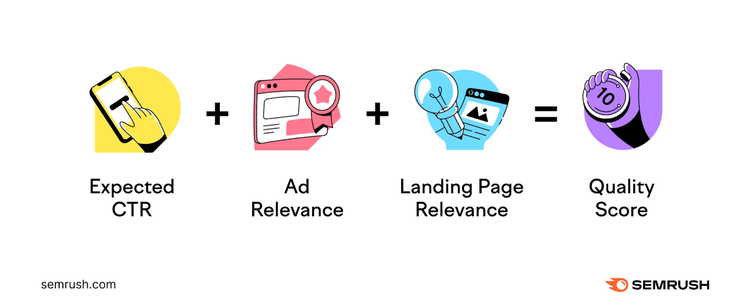
Don't forget about your landing pages! They should be clear, quick to load, and easy to navigate. A seamless landing page experience often translates into higher conversions. And of course, the relevance of your landing page contributes to your Quality Score.
Finally, if automated bidding isn't viable due to low conversions, switch to manual bid adjustments. This approach requires more attention. But it can yield results while you gather enough data to try automation again.
Google Ads Target CPA Best Practices
Set Realistic Target CPA Goals
- Consider your budget: Set your target CPA too high and it cuts into profits. Too low and it constrains ad visibility. Your target CPA should be a percentage of your profit per sale and also a number that supports sustainable campaign growth.
- Align your target CPA with precise marketing objectives: When setting up your ad, you define the specific action you consider a conversion. It could be boosting sales, driving web traffic, or generating leads. Your target CPA should correspond to the value you place on that action. You might set a higher target CPA for conversions that result in sales and a lower one for email signups, for example.
- Don’t keep your target CPA static: Google Ads itself will adjust your actual bids within your budget using real-time bidding. But you should periodically review your Target CPA bid amount based on fresh competitor research as well as your own profit per sale, conversion rate, and desired profit margin metrics.
Use Reliable Conversion Tracking
Target CPA will only work properly if your conversion tracking does. Without accurate conversion tracking, you're flying blind and potentially wasting ad spend.
Be sure to:
- Check Google Ads conversion tracking: Verify your conversion tags are correctly registered by Google Ads. Refer to the Google support page for detailed information on conversion tracking data.
- Use Google Tag Assistant for verification: This tool lets you check in real time whether a tag is firing on conversion pages. It's crucial to audit regularly, especially after updates to your website that could affect tracking.
- Define primary and secondary conversions: Focus on primary conversions for your bidding strategies. But don't overlook the importance of tracking secondary conversions as well.
- Adopt enhanced conversions: Enhanced conversions make your ad results clearer by improving how conversions are counted. They work around browser restrictions and privacy tools that can hide when people take actions, like making a purchase, after clicking your ads.
Reach Your Target CPA with Ease
Optimize your Google Ads campaigns with the advanced targeting and performance tracking features of Ads Launch Assistant.
Regularly Review and Fine-Tune Strategies
Regular reviews sharpen your target CPA strategy.
Set a schedule—weekly or monthly—to check on how well your Target CPA campaign is performing. Use Ads History from Semrush to spot competitor trends. And Advertising Research for insight on competitor keywords.
Adjust bids using fresh data. Boost high-performing keywords to maximize visibility. Or pause underperforming ads to optimize your spend. Use insights from A/B tests to optimize conversions.
Iteration is key.
Make reviewing part of a feedback loop, using analytics to refine constantly. With reliable tools, you can keep your campaigns sharp and evolving.
Integrate Target CPA with Your Overall Campaign Strategy
While technically you can call this a best practice, its scope deserves a standalone mention.
Target CPA bidding isn't a solo act. Ads using this feature are just a part of the digital marketing ensemble.
To help make every bid count:
- Factor in customer lifetime value (CLV): If customers typically stick around and spend more over time, it makes sense to have a higher target CPA for acquiring them. The investment pays off when customers continue to purchase well into the future.
- Consider how competitive your industry is: Competitive markets might need a heftier CPA for long-term gains. Use tools like Advertising Research to understand what competitors are spending for keywords you both use.
- Use other key performance indicators (KPIs): Different KPI combinations can inform budget, ad creative, and keyword optimization decisions. One example is contrasting ROAS with Cost Per lead (CPL), which measures cost efficiency in acquiring prospects. Together, they can help identify high-performing keywords and ads that generate leads or sales at a lower cost.
- Bridge organic and paid efforts: Analytics tools often merge data from your organic marketing efforts (like search engine optimization) and paid marketing efforts (like ads). By understanding this information, you can tailor your ads to mirror the organic content that draws users in, such as using similar messages or offers. This way, visitors are more comfortable moving from reading about your product to clicking on your ad and making a purchase.
- Track your customers’ steps: Start with understanding how people find and interact with your site. For example, tag your blog posts to identify visitors who could be interested in more information. Later, show them targeted ads to encourage a purchase. This is called remarketing, and Google offers a breakdown of how you can do this.
- Test different strategies: Create separate ad groups with and without target CPA to compare performance. This lets you confidently identify the strategy that achieves better results. So you can apply a budget where your bids are most cost-effective.
Next Steps with Target CPA
Steer your Google Ads with a well-strategized Target CPA plan. The pathway to your brand's success is in the intersection of data and strategy.
Ready to enhance your Google Ads strategy? Start with Advertising Research and Ads History from Semrush to sharpen your Target CPA campaigns to maximize conversions and minimize waste
Try it for yourself with a free trial.
Elevate Your Digital Strategy
with a Semrush Subscription

Sydney has been creating content for over 10 years. She has been a writer, content manager and coordinator, editor, and strategist. At Semrush, she’s a blog editor who makes sure each article is as accurate, optimized, and helpful as possible.

Tells Google to show you more from Semrush in AI, Search, and Discover.