
Google’s AI Overviews (AIOs) now reach more than two billion monthly users across 200+ countries.
Which means it’s critical to identify which queries trigger these summaries, how your brand shows up, and which competitors are being cited.
Semrush offers six tools to monitor AI Overviews and improve your brand visibility.
Here’s how to use them for everything from monitoring how frequently AIOs appear for your target keywords to conducting an industry-wide trend analysis.
Note: For enterprise-level businesses, Semrush Enterprise AIO offers all of the following capabilities with higher limits and more support.
1. Organic Rankings: See where AI Overviews compete with your SEO rankings
The Organic Rankings tool shows how often AI Overviews appear across the keywords you already rank for.
This can help you understand how your visibility is being impacted.
You can track:
- Keywords with AI Overviews where your domain ranks in the AIO itself. These are your wins.
- Keywords with AI Overviews where your domain doesn't rank in the AIO. These are your gaps.
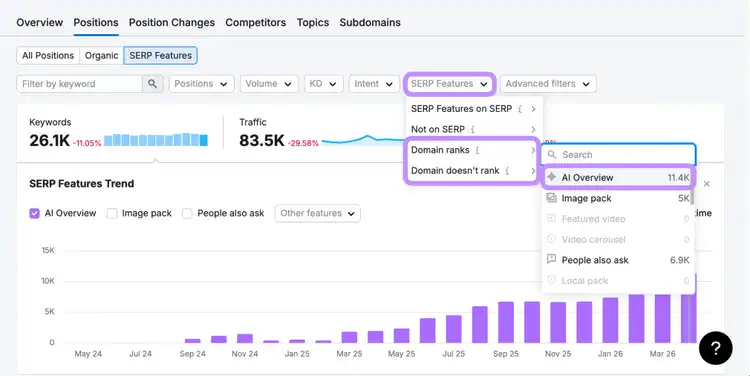
For any pages that are ranking as a traditional search result but not in the AI Overview, look at the sources being cited to understand how they answer the query. Then improve your content to better address that intent.
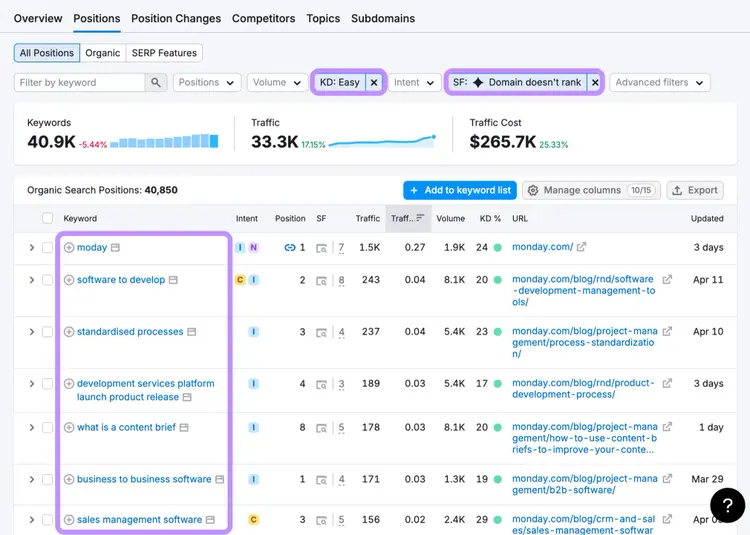
Tip: Click “KD” > “Easy,” and select “SERP Features,” hover over “Domain doesn’t rank,” and click “AI Overview” to find low-competition keywords where you’re already ranking but not yet cited. These are strong opportunities to gain visibility in AI Overviews with targeted updates.
2. Position Tracking: Track your daily presence in AI Overviews for a custom set of keywords
The Position Tracking tool shows how often AI Overviews appear across a custom set of target keywords and whether your domain is included.
Unlike Organic Rankings, it’s based on a keyword set you define. You can group keywords by priority and monitor changes with daily updates.
This lets you track the keywords and topics that matter most to your business (even if you’re not ranking for them yet) and see how AI Overviews affect those results over time.
Once tracking is set up, you can measure:
- The share of your target queries that trigger AI Overviews
- How often your domain is cited within those results (share of voice or visibility %)
- How these metrics change over time
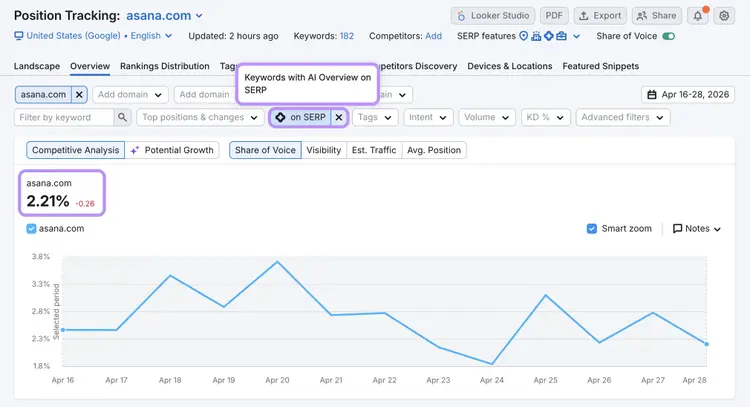
Tracking both how frequently AI Overviews appear, and then how often your domain is cited within them helps you see how well your strategy is helping you attain AI visibility.
The amount of keywords you can track in Position Tracking depends on your Semrush subscription level. And with Semrush, you can track ChatGPT visibility alongside AI Overviews and traditional Google rankings.
3. Visibility Overview: Understand your brand’s AI Overview coverage across different topics
The Visibility Overview report gives you a topic-level snapshot of your brand’s presence in AI Overviews.
Click the “All AI platforms” drop-down at the top of the report and change it to “AI Overview.” Now the Visibility Overview report shows your:
- AI Visibility: A score between 0 and 100 that reflects how often your brand appears in AIOs and how consistently it shows up compared to competitors in your niche
- Mentions: The number of prompts that return AI Overview responses mentioning your brand
- Citations: The number of AI Overviews that cite your domain as a source
- Cited Pages: The total number of pages on your site that are cited in AI Overviews
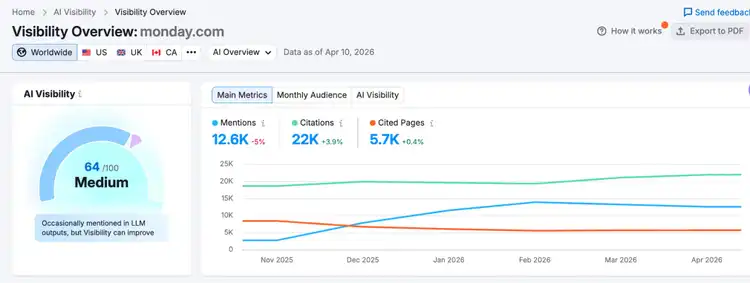
And the table below lets you identify specific prompts and topics where your brand is already showing up. And where it’s missing.
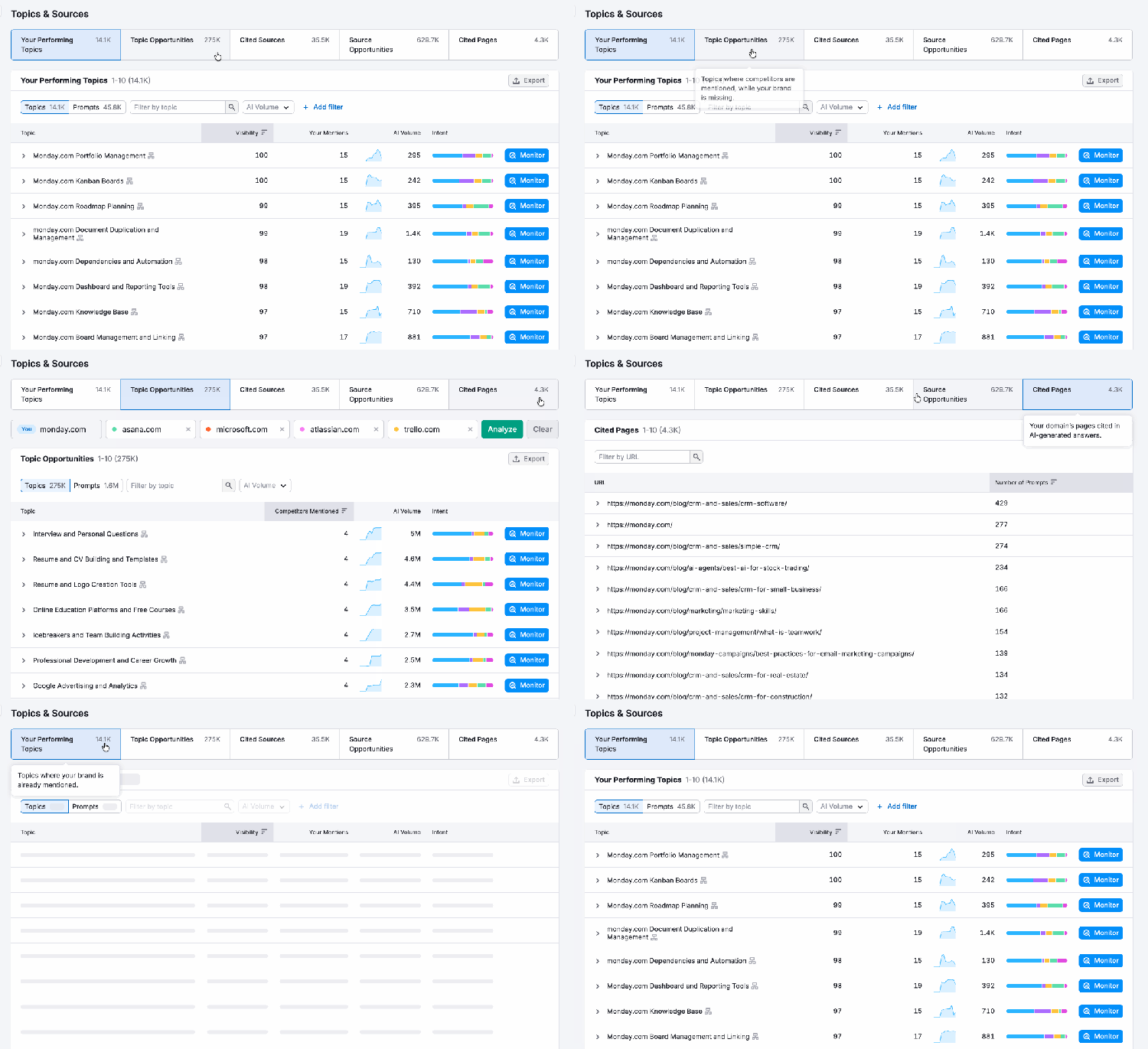
Use the tabs at the top of the table to switch between views:
- Your Performing Topics shows where your brand is already included in AI Overviews. Use this view to identify patterns behind your current inclusion.
- Topic Opportunities shows where competitors are mentioned but your brand isn’t. These are the topics worth covering.
- Cited Pages shows which of your URLs AI Overviews are citing. Use this view to identify patterns in the pages that are getting picked up like format, structure, and how the information is presented.
4. Competitor Research: Benchmark your competitors' brand mentions in AI Overviews
The Competitor Research report lets you compare your brand’s presence in AI Overviews directly against up to four specific competitors.
Just set the filter at the top of the report to “AI Overview” and click the “Mentions” tab to see how your mentions compare to rivals’ mentions.
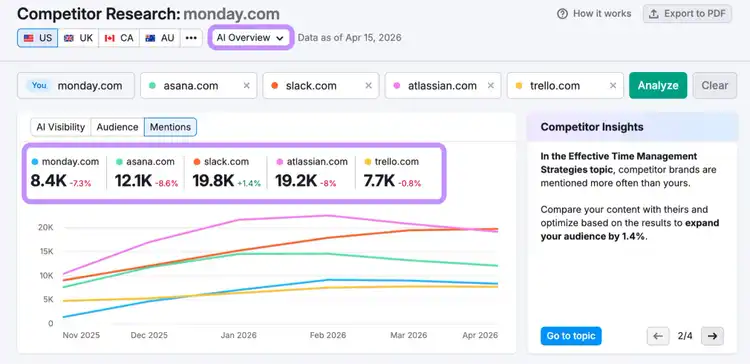
The Competitor Research report also lets you identify the topics where your visibility is weaker than competitors.
You can even see the topics and prompts driving your competitors’ AI mentions to uncover competitive gaps.
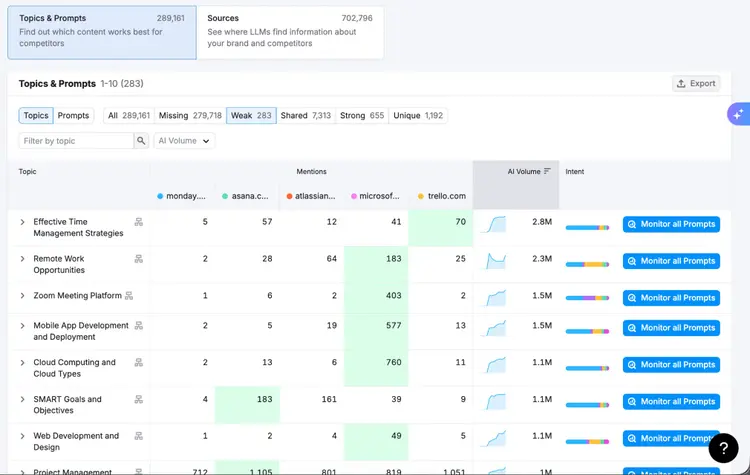
Start closing these gaps by creating stronger content around those topics, increasing your presence across third-party sources, and structuring your pages so they’re easier for AI platforms to extract and cite.
5. Prompt Research: Find popular queries and topics your audience sees AI Overviews for
The Prompt Research tool helps you understand what your audience is asking AI tools and where you have opportunities to show up.
Enter a broad topic related to your brand (e.g., “project management”) and select “AI Overview” to see the volume of prompts and how those queries are grouped into related topics.
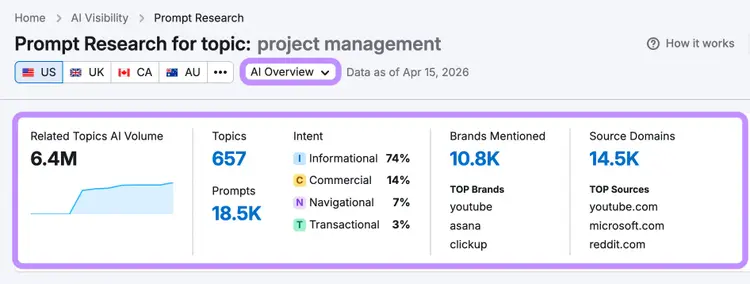
From there, you can explore topics to see the exact questions users are asking and how AI Overviews respond.
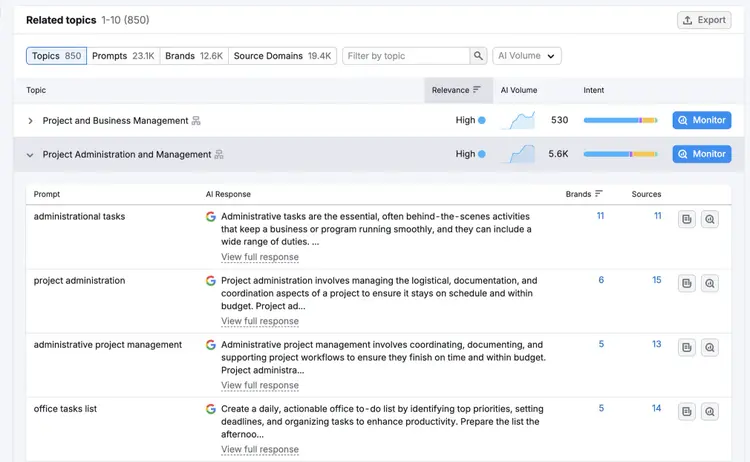
It also lets you benchmark the top mentioned brands and cited sources for any topic.
Use this report to:
- Identify high-demand topics and prompts worth targeting
- Understand how AI Overviews structure answers to those queries
- See the top brands and sources that are being mentioned and cited by AIOs across a specific topic
6. Semrush Sensor: Monitor industry-wide AI Overview volatility
The Semrush Sensor shows how often SERP features like AI Overviews appear across queries and industries, helping you understand how search results are changing.
At a high level, the SERP volatility score reflects how much rankings fluctuate over time.
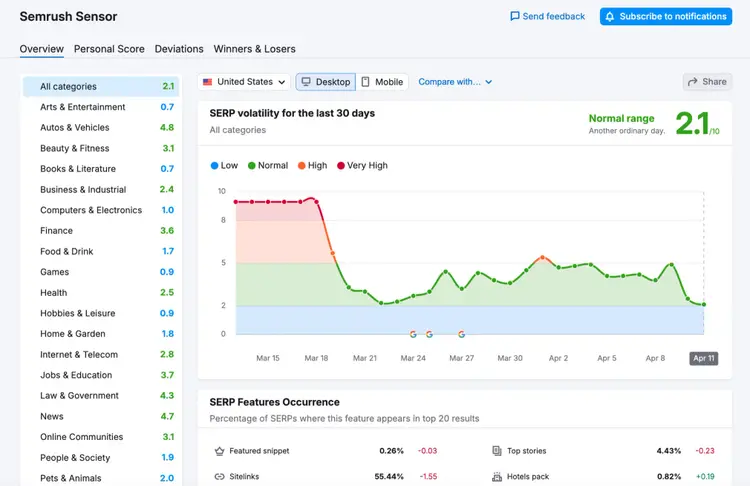
You can also track the share of results that include AI Overviews in the top 20 results and how that percentage changes, revealing whether they’re increasing or decreasing in your category.
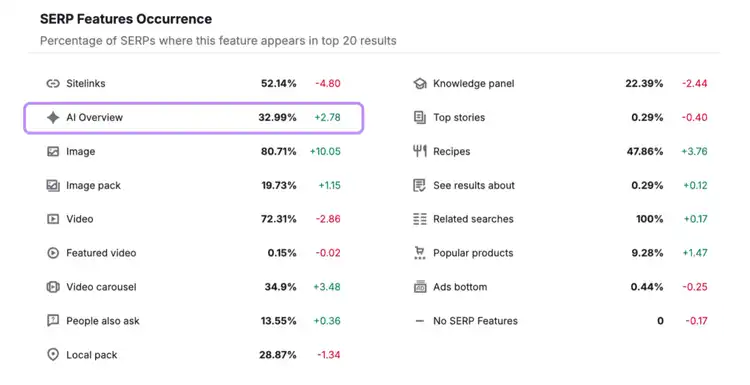
Use this data to sense-check what’s happening in your own performance.
If AI Overviews are increasing across your industry and your traffic or CTR is declining, your site’s performance may be driven by industry-wide changes to the SERP.
But if your traffic drops while AI Overviews in your industry are stable or decreasing, it likely points to something else. Like an increased competition or outdated content.
Use this tool to monitor AI Overviews in your industry and understand whether any organic traffic drops are driven by broader trends or issues specific to your site.
Monitor AI Overviews from every angle
You can access all the tools covered in this article with a Semrush subscription.
Use them together to track how your brand appears in AI Overviews, identify gaps, and improve your visibility over time.
Monitor AI Overviews
with Semrush

Luke has over ten years of experience in digital marketing, writing about SEO, AI search, and how to get the most out of Semrush. He spent years building Semrush‘s Knowledge Base, working directly with product teams to explain every tool and feature on the platform so marketers can find the right tools and do better work.
Luke Harsel
Luke leads content for Semrush‘s product-led growth team, creating guides and research that show marketers what‘s possible with Semrush‘s tools.

Tells Google to show you more from Semrush in AI, Search, and Discover.
Table of contents
- 1. Organic Rankings: See where AI Overviews compete with your SEO rankings
- 2. Position Tracking: Track your daily presence in AI Overviews for a custom set of keywords
- 3. Visibility Overview: Understand your brand’s AI Overview coverage across different topics
- 4. Competitor Research: Benchmark your competitors' brand mentions in AI Overviews
- 5. Prompt Research: Find popular queries and topics your audience sees AI Overviews for
- 6. Semrush Sensor: Monitor industry-wide AI Overview volatility
- Monitor AI Overviews from every angle