
How to Analyze a Website’s SEO: Your Step-By-Step Guide
Lorem ipsum dolor sit amet, consectetur adipisicing elit. A accusamus alias aliquid consectetur consequatur dolore eius libero maxime, mollitia officia quam quasi quo voluptates. Architecto autem cum, cumque delectus doloribus est harum id illum necessitatibus placeat quis repellendus, reprehenderit saepe sequi sunt vel voluptates?
Gary Gary, Organic Growth Consultant
What Is SEO Analysis?
An SEO analysis involves evaluating your website to identify ways to improve your performance in organic (unpaid) search engine results, which can lead to more traffic and better business results.
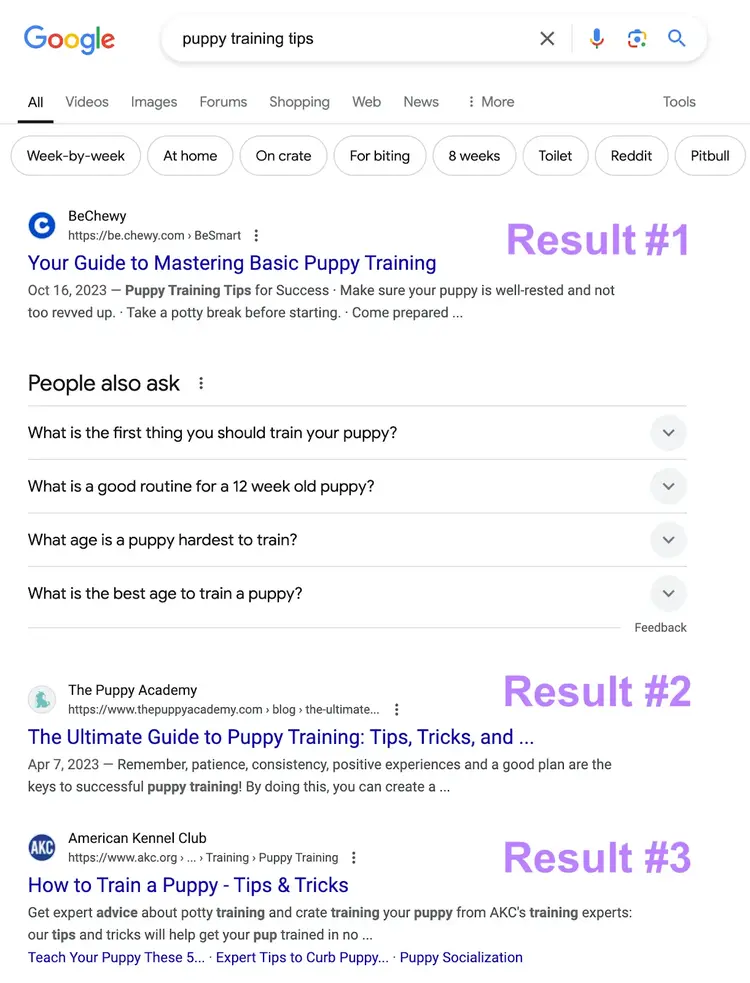
It involves studying your content, your site’s technical health, competitors' sites, and more. Because these can all affect how search engines like Google rank (order) search results.
Like this:
Types of SEO Analyses
Many website elements can impact your SEO performance. So, doing different types of analyses can help you narrow in on the most pressing issues.
Below are the main types.
Technical SEO Analysis
Technical SEO involves optimizing the technical aspects of your website. And the corresponding analysis is mainly focused on ensuring you don’t have any issues that could prevent search engines from crawling (finding) and indexing (storing in a database) your content.
Some of the main issues you’ll look for are those related to your:
- XML sitemap: A file that tells search engines which of your pages you want to be indexed
- Robots.txt: A file that tells Google which pages on your website they should and shouldn’t access
- Site’s architecture: How your site is structured and organized
- Website’s navigation: The journey of clicking the links on a website to find new pages
- URL structure: The organization and format of a web address
- Internal links: Links that point to other pages on your website
- Page speed: How fast your pages load for users
- Site’s mobile-friendliness: How your site performs on mobile devices
The fastest way to check your site’s technical SEO is to use our free website audit tool. We’ll show you how to do so later in this article.
On-Page SEO Analysis
An on page SEO analysis entails evaluating your individual webpages to make sure they’re as search engine-friendly as possible and include the target keywords you want those pages to rank for.
On site elements to optimize include:
- Title tags: HTML elements that specify your page titles and can show in search results
- Meta descriptions: HTML elements that provide a short summary of the content of the page
- Headings: HTML tags used to separate headings and subheadings from the body content
- Body content: Paragraphs or other main text on a webpage
- URLs: The page address that also specifies protocols and can include parameters
- Images: Visual elements (e.g., logos, illustrations, etc.) often in JPEG, PNG, or WebP file types
- Schema markup: Snippets of code that qualify the webpage for Google’s rich results (e.g., popular products, organization, etc.)
We’ll go over how to uncover issues related to these elements later in this guide.
Backlink Analysis
Backlinks are links on other websites that point to your website. They’re an important factor that Google uses for organic rankings, so you’ll want to evaluate the number and quality of links coming to your site.
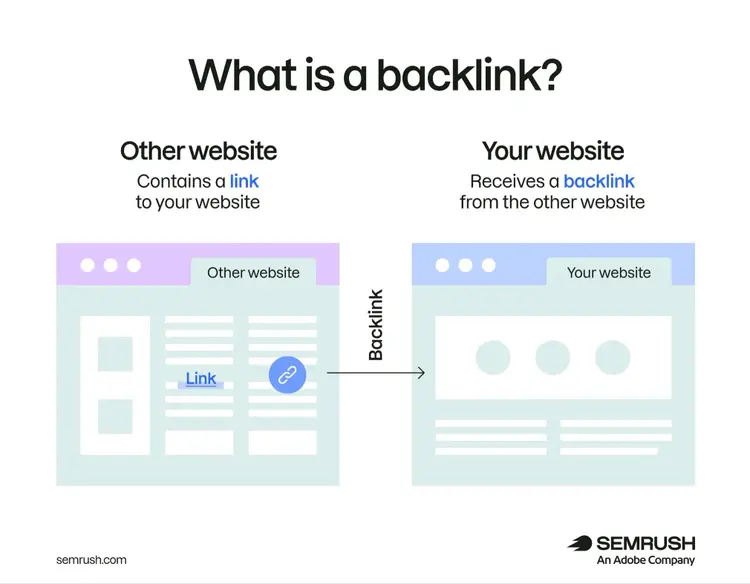
But not all backlinks help your SEO that much. The best ones come from sites that are topically relevant to yours and have strong website authority (which can be checked using our free Website Authority Checker).
This type of analysis involves evaluating your backlink profile for:
- Total backlinks: The total number of backlinks pointing toward your website
- Referring domains: The specific domains that link to your website and how authoritative they are
- Toxic links: Links that show signs of spammy practices
- Anchor text: The text that forms a hyperlink (Google uses anchor text to understand what the linked resource is)
It can also be useful to compare the above backlink factors against your competitors’ sites. So, we’ll cover how to do so later in this guide.
SEO Competitive Analysis
This type of analysis involves comparing your website’s SEO performance against your competitors’ performance. And can help you identify what it will take to compete with them.
A competitive analysis often involves comparing yourself against rivals for the following:
- Target keywords: Seeing whether you outperform your competitors for valuable terms relevant to your business. Or whether they’re ranking for terms you have yet to target.
- Top pages: Identifying which pages on competitors' sites get the most organic traffic. And seeing whether you have any similar content on your site.
- Total backlinks: Comparing the number and quality of rivals’ backlinks to yours
- Authority Score: Seeing who has a higher Authority Score. Which can signal greater ranking potential across all the pages of a site.
- Referring domains: Comparing which sites are linking to your competitors. And if they have referring domains that you might want to reach out to for linking opportunities.
We’ll show you how to do this type of analysis later in this guide.
How to Analyze Your Website’s SEO Performance
Follow the below steps to perform a complete analysis of your website’s SEO.
1. Analyze Your Technical SEO
It’s best to start by analyzing your site’s technical SEO. Because technical elements impact the ranking potential of all of your webpages.
Get a fast technical read on a URL with our free SEO check. To analyze technical SEO across your full site, use Semrush Site Audit.
Start by entering your homepage URL into the text bar. Then, click “Start Audit.”
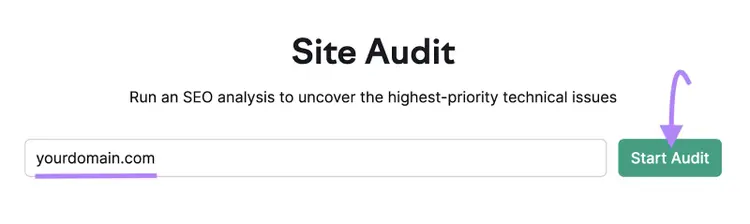
Follow the prompts to configure your audit.
Once your audit is ready, find the “Crawlability” section and click “View details.”
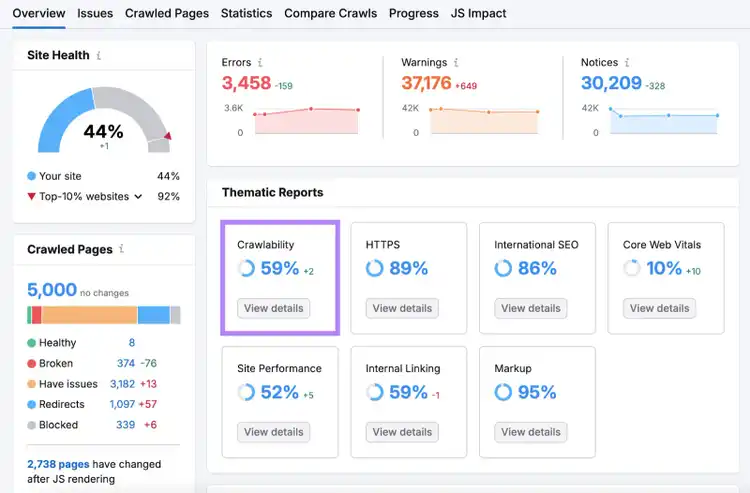
The report will help you evaluate how easily Google can crawl and index your important pages.
For example, locate the “Crawl Budget Waste,” section. It details where you’re wasting crawl budget. Which is the number of pages that Google is willing to crawl on your site in a specific period.
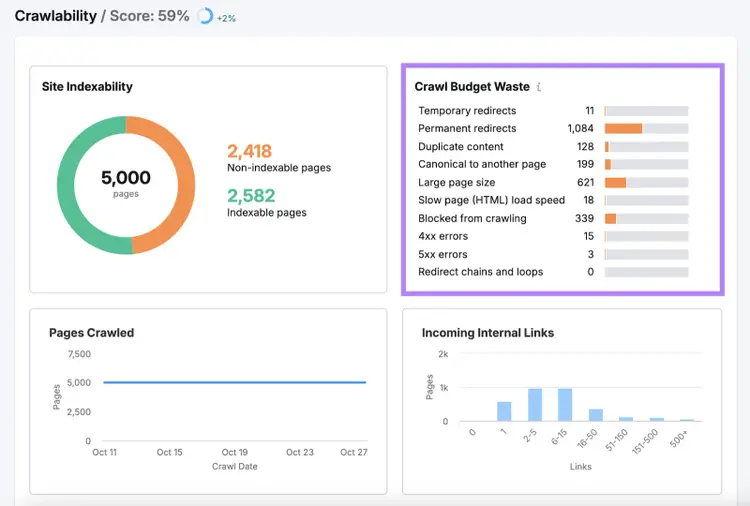
You want to be careful about things like having too many pages that serve errors or too many redirects. Because if you have many issues like these, Google might move on before it gets to all your important pages.
If you click on the orange bar to the right of an issue. You’ll see a list of the pages affected by that specific issue.
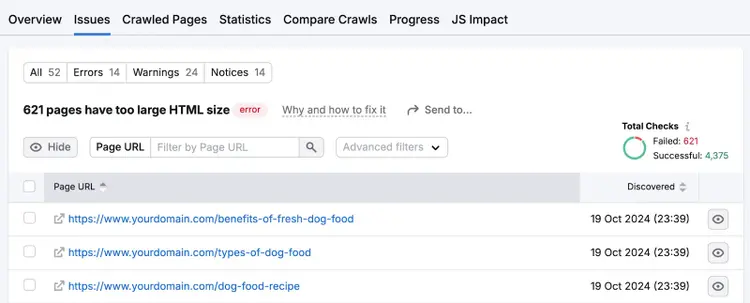
Next, return to the “Overview” tab. Then, click “View details” under “Site Performance.”
This section will list any issues related to your site’s page load speed and other performance indicators.
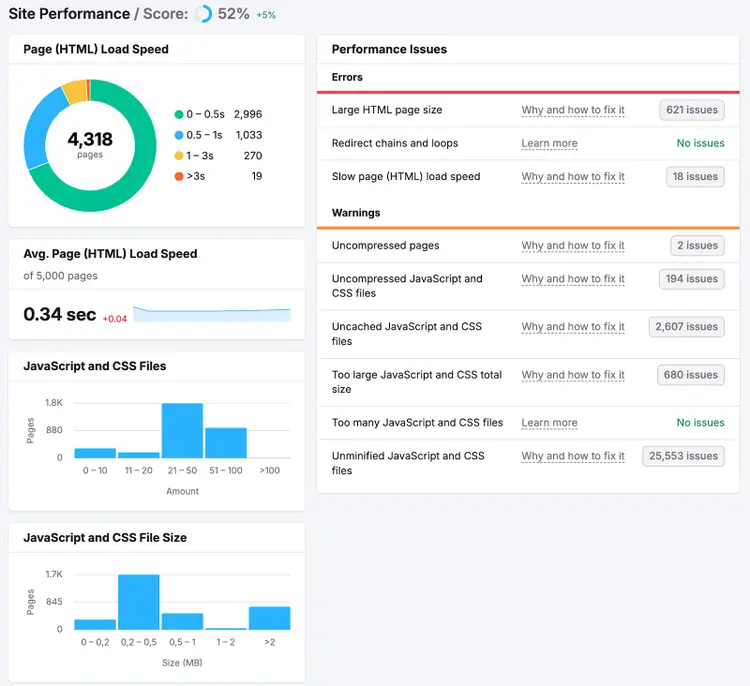
Page experience is a confirmed ranking factor. So, it’s important to resolve related problems like slow speed.
Plus, performance issues are bad for the user experience. And may discourage people from staying on your website, making purchases, or booking appointments.
Improving site performance may require changes to your HTML or JavaScript files. So, depending on your level of knowledge, you may want to work with a web developer to resolve them.
Find and fix website issues
with the Site Audit tool
2. Analyze Your On-Page SEO
Next, do an on-page analysis to find ways to improve your most important webpages—improving these existing ones can be a more cost-effective way to improve performance than creating new content.
So, review the below website elements on each page you want to rank for.
Title Tags and Meta Descriptions
The title tag and meta description of a webpage tell users and search engines what your content is about. And Google may display them to users when showing your pages in search engine results.
Like this:
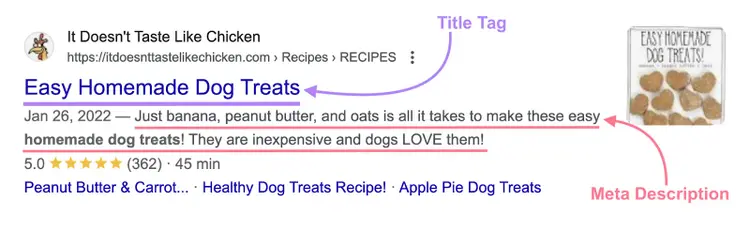
Google uses the title tag to understand a webpage’s content. And both the title tag and meta description can influence whether users click through to your page.
To check them, click on the “Issues,” tab in Site Audit.
Then, click the “Category” drop-down menu and select “Meta tags.”
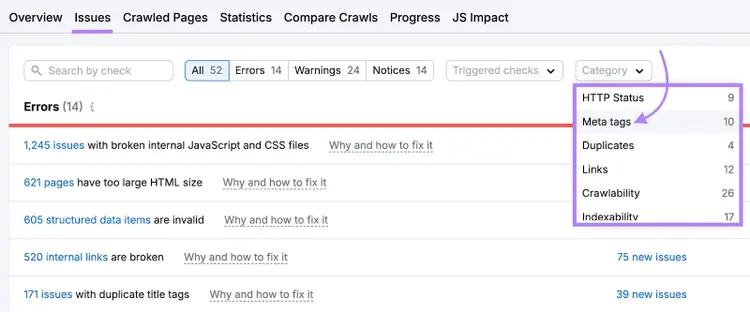
If any critical issues are identified, the report will list them.
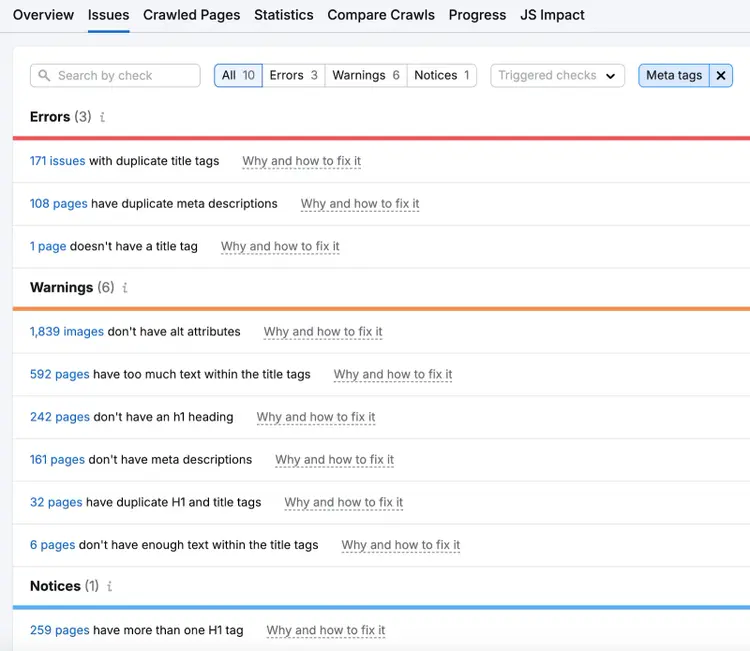
Site Audit checks your title tags and meta descriptions for the following errors:
- Missing title tags or meta descriptions
- Duplicate title tags or meta descriptions
- Proper character counts
To get more details about a specific issue, click on the blue text at the beginning of the row.

You’ll see additional details about the issue. Like what pages the issue was identified on.
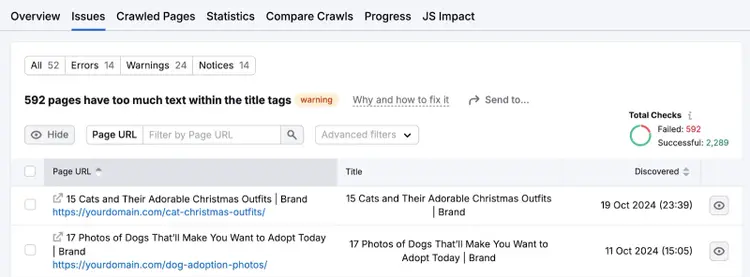
Make sure to review these issues. And work to resolve them.
Content Structure
Headings are HTML tags ranging from H1-H6 that define headings on a webpage and help Google understand what topics your content covers.
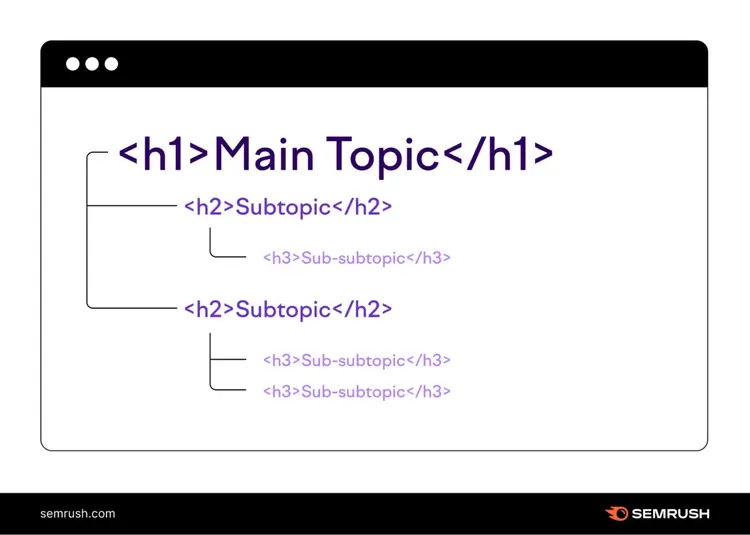
Headings also give your content structure and make it easier to navigate. Because they can help users quickly scan to find the information they’re looking for.
To check for problems related to your H1 headings, return to the “Issues” tab in Site Audit. And enter “h1” in the search bar.
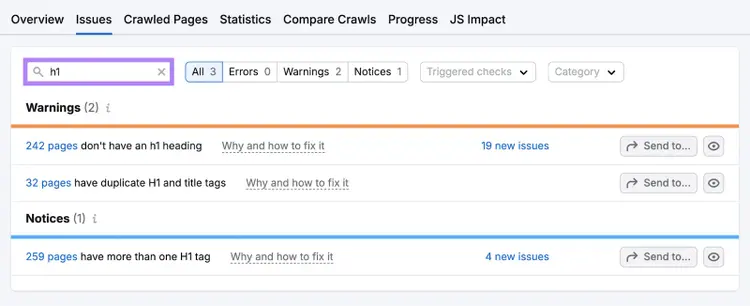
Site Audit checks for the following:
- Missing H1 tags
- Duplicate H1 tags
- Multiple H1 tags on a page—it’s best to stick to one
Again, click on the blue text next to any issue to get more details about the pages where it was detected. And work to fix the problems.
Keyword Use and Content Quality
Next, evaluate your content’s quality and how well your pages incorporate your target keywords. Because writing useful content that includes keywords naturally (without keyword stuffing) is key for on-page SEO.
Use On Page SEO Checker for this.
Enter your homepage URL into the text bar and click “Get Ideas.”
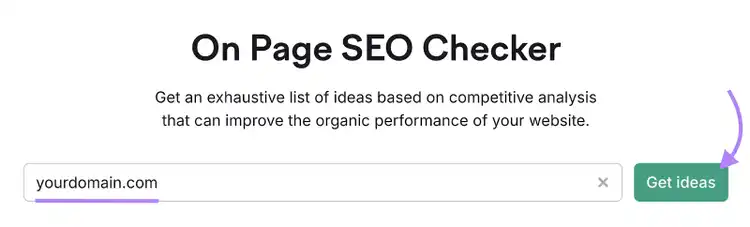
Follow the prompts to finish the setup, then the tool will show a detailed report with ideas for improvement.
Click “# ideas” next to a page you want to analyze.
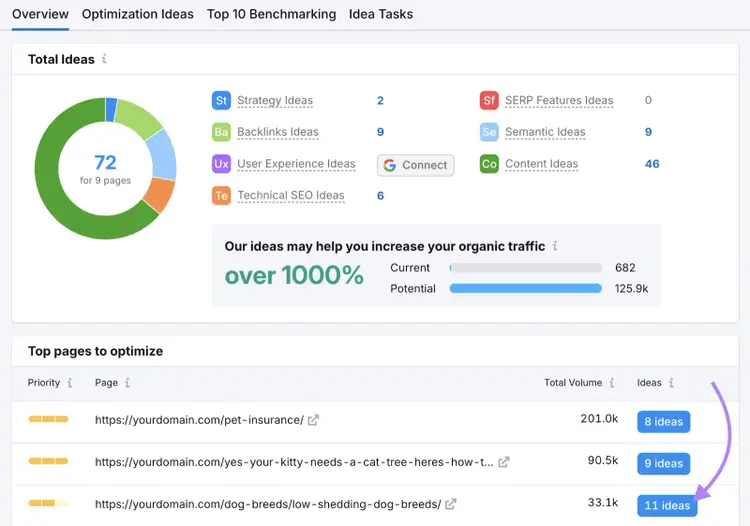
On the next page, scroll to the “Content” section. And study the details about your page’s readability and keyword use to determine what sorts of improvements you need to make. Like using target keywords in the <body> tag.
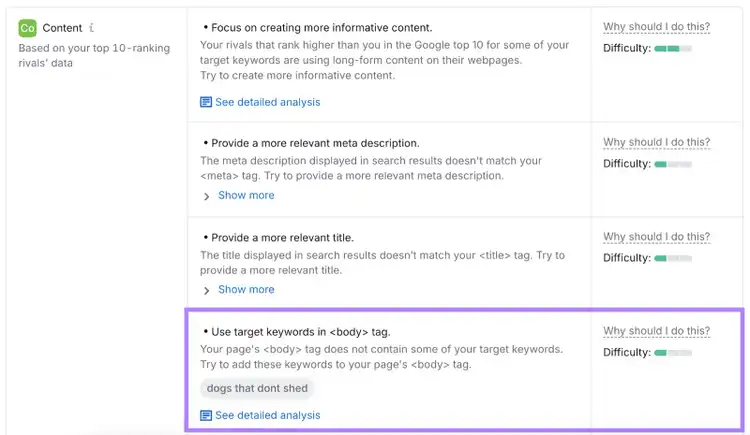
Repeat this process for all your pages. And work through the suggestions.
Now, you’re ready to update your content.
In addition to what On Page SEO Checker flagged, make sure to use your keyword and any variations in different headings.
You should also ensure that your content is high-quality, helpful, and people-focused. Which you can do by:
- Including original research or analysis
- Providing a comprehensive topic overview
- Showcasing first-hand expertise and knowledge
- Including original insights that go beyond the basics
3. Check Your Internal Links
Internal links help Google discover and index your pages, so you should check that there are no issues with them.
To do this, return to your “Overview” report in Site Audit.
Click “View details” under “Internal Linking.”
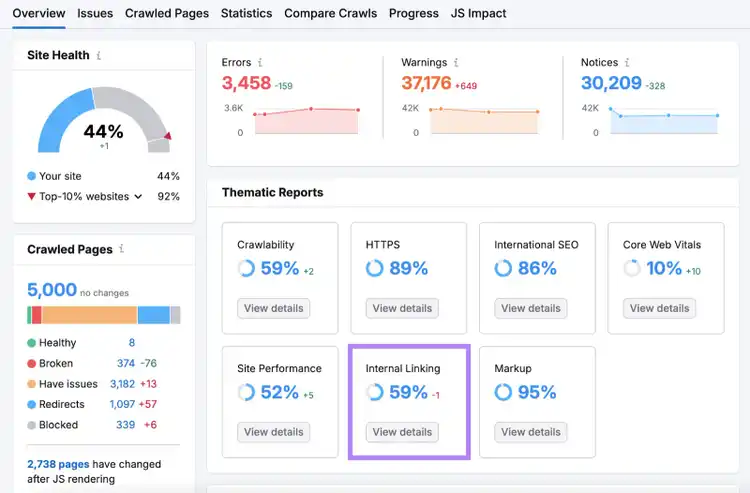
You’ll see a percentage score for your overall internal link health. As well as a list of issues related to internal links. The most impactful ones will be listed under the “Errors” section.
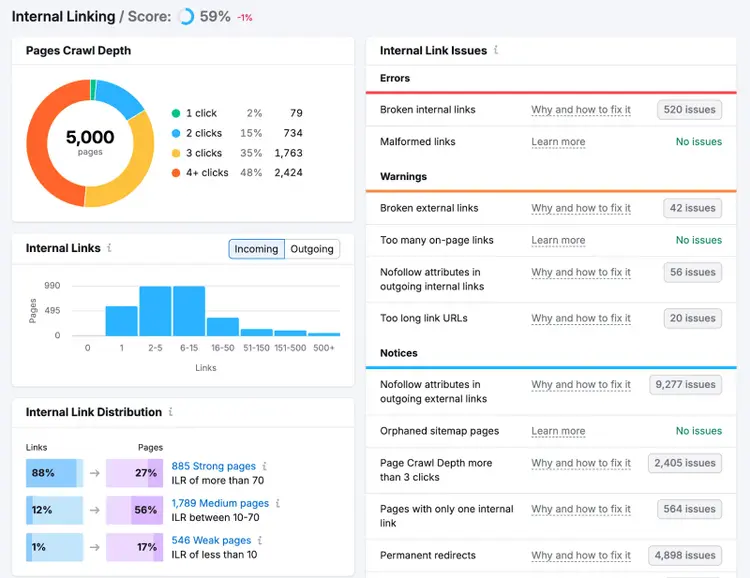
Some examples of issues the tool will flag include:
- Broken links (both internal and external)
- Too many on-page links
- Pages with only one internal link
To resolve these issues, you’ll need to make adjustments to your links inside your content management system (CMS) or other website platform.
If you’re unsure of how to fix something, click “Why and how to fix it” next to any issue to get directions.
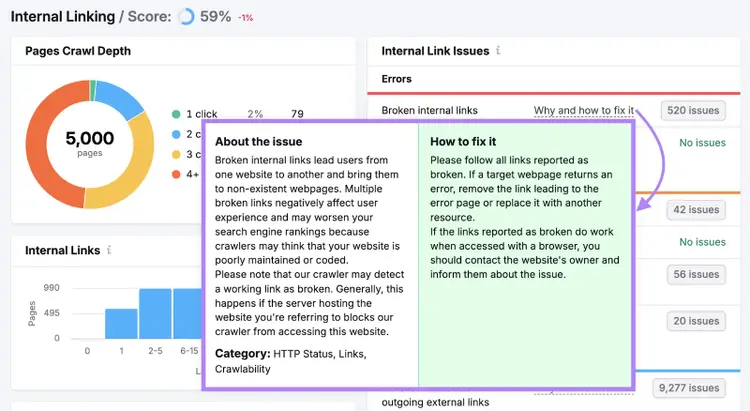
Linking issues tend to happen over time as your website grows. But if you have a newer website, it’s more likely to suffer from too few internal links.
So, find ways to add them by following these best practices:
- Link to and from your most important pages
- Use anchor text that’s relevant to the content of the linked page
- Keep your anchor text short and descriptive
- Don’t overdo it—too many internal links can look spammy
4. Check Your Website’s Backlink Profile
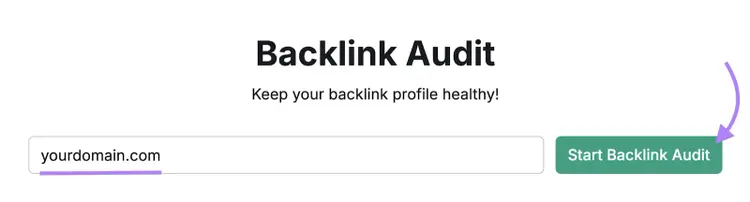
Because backlinks are so important for rankings, you should check them when analyzing your website’s SEO. And you can use Backlink Audit to do that.
Type your homepage URL into the first text bar. Then, name your project (if desired), and click “Create project.”
(If you’ve already created a project for your website, find it and click on it when you open the tool.)
You’ll get a detailed report about your website’s backlink profile. Which shows your website’s Toxicity Score.
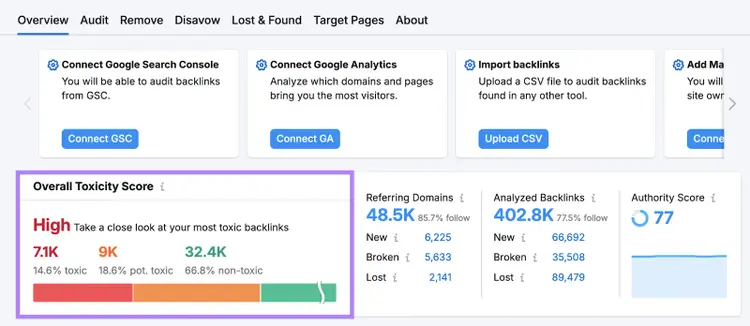
You want your backlink profile to have a “Low” toxicity score. If yours is “Medium” or “High,” that’s a good sign you should work to gain more high-quality, relevant backlinks.
And you can find backlink opportunities using the Backlinks tool.
To start, enter a competing domain and click “Analyze.” When the report loads, click “Indexed Pages” and select “Broken Pages.” You’ll get a list of pages that don’t work properly.
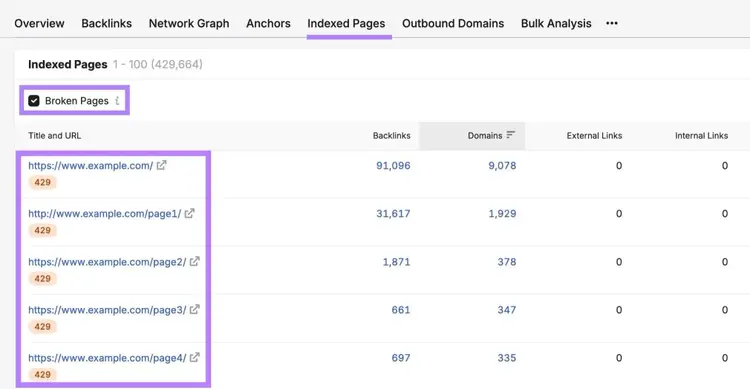
Look for a page similar to ones you already have or one you can create and click its number of backlinks.
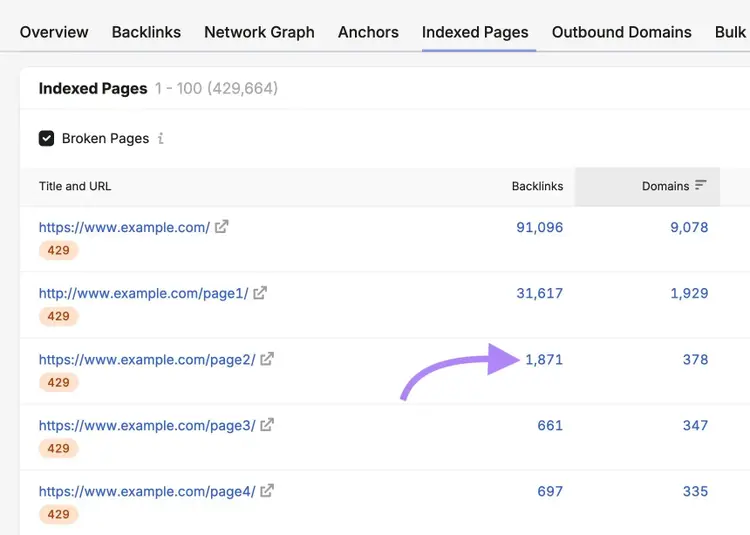
This report shows all of the backlinks currently pointing to the broken page.
Find the best backlink opportunities by selecting “Best” to filter backlinks with a follow attribute.
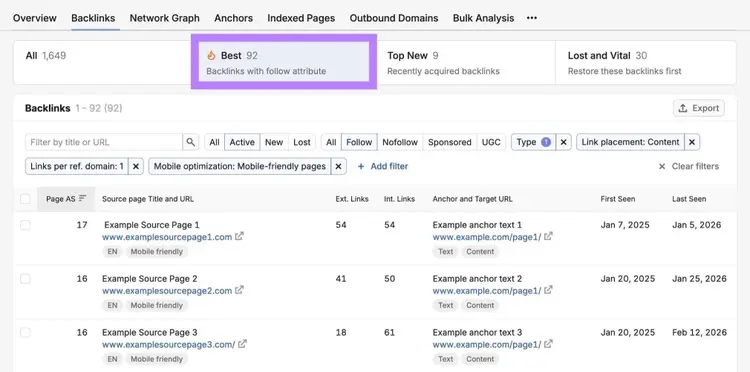
Look for relevant, high-quality sites. When you find one, send an email asking if they can link to your working resource instead of the broken one.
Here’s a template you can use in your link building outreach:
Subject: Quick question about your [topic] article
Hi [Name],
I was reading your article on [specific topic] while researching [related subject], and I noticed that the link to [broken resource/page name] in your section about [relevant section] appears to be broken.
I thought I’d let you know so you can keep your resource up to date.
I recently published a [type of content] about [your topic] that covers [unique value proposition: original research, updated information, comprehensive guide, etc.]. If you’re looking for a replacement, it may be a helpful alternative for your readers:
[URL]
Either way, thanks for creating such a useful resource. I hope this helps you keep the page updated!
Best,
[Your name]
5. Evaluate Yourself Against Your Competitors
Next, compare your keywords and backlinks to your competitors’ to complete an SEO competitive analysis that can help you uncover insights you might be able to use in your SEO strategy.
Some of the resulting actions might include optimizing for the same keywords, creating similar content, or reaching out to your competitors’ referring domains for link building opportunities.
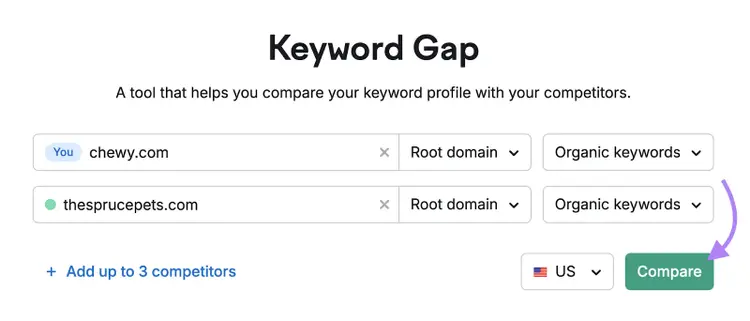
To analyze a competitor’s keywords, use Keyword Gap.
Enter your domain and up to four competitors’ domains. Then, select your target location and click “Compare.”
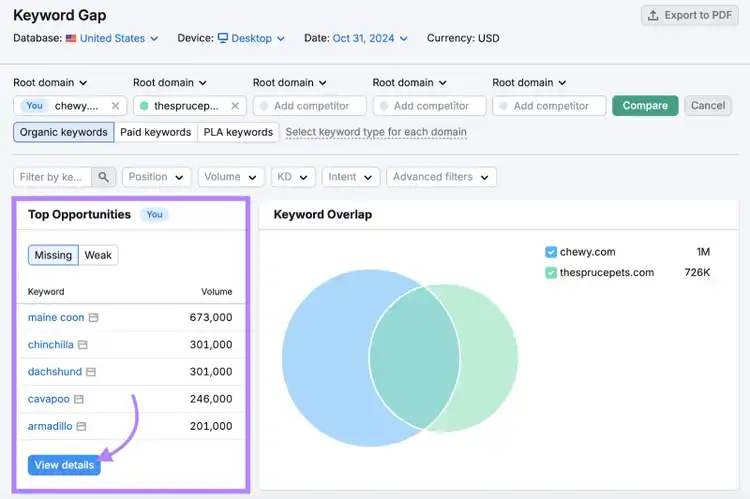
In the keyword comparison report, look for the “Top Opportunities” table.
Select the “Missing” tab. Then, click “View details.”
You’ll see a table of keywords that your competitors are ranking for but your website isn’t.
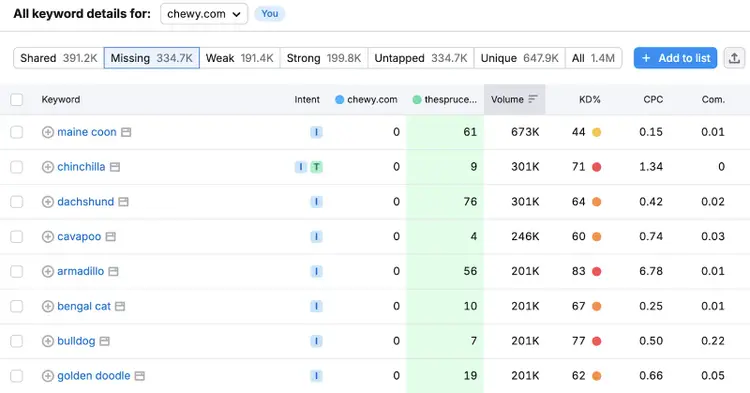
You may want to target some of these keywords with your website content. As long as they’re relevant to what your business offers.
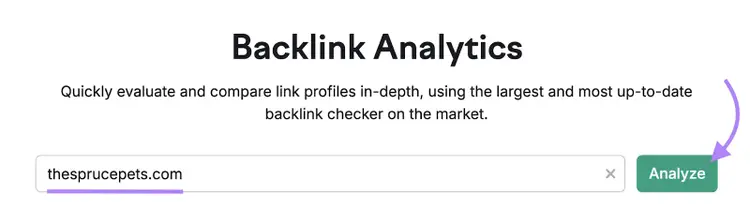
Next, analyze your competitors' backlinks using the backlinks checker.
Enter a competitor’s domain into the text bar. Then, click “Analyze.”
You’ll get key metrics related to their backlinks. Like what websites are linking to them, how reputable those sites are, and what anchor text the websites use to link to your competitor’s site.
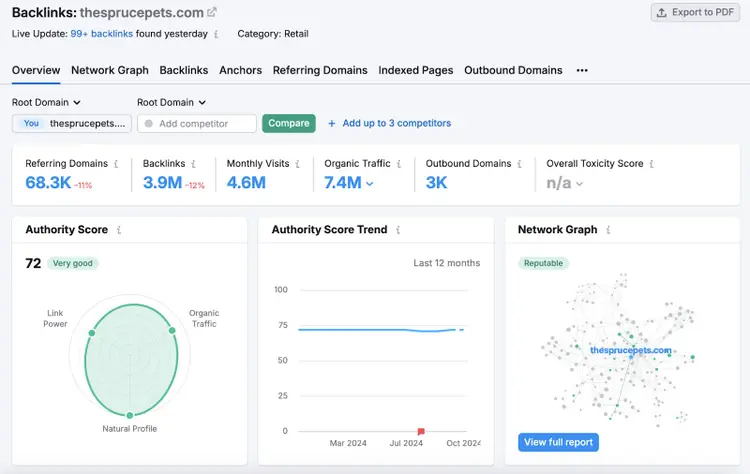
Then, leverage that information in your link building efforts.
Refine Your SEO Strategy
You should regularly analyze your SEO performance as you publish content, acquire and/or lose backlinks, and face more competition.
Start with our free SEO checker for a baseline read. Then, for recurring monitoring that catches problems early, set up regular audits in Semrush Site Audit.
You can access it by signing up for Semrush.
Access 55+ Tools
with a Free Semrush Account

Sydney has been creating content for over 10 years. She has been a writer, content manager and coordinator, editor, and strategist. At Semrush, she’s a blog editor who makes sure each article is as accurate, optimized, and helpful as possible.

Tells Google to show you more from Semrush in AI, Search, and Discover.