
Higher Education SEO: The Ultimate Guide for 2025
Why Is SEO Important for Higher Education?
Higher education SEO is the process of improving college and university website visibility in search engines.
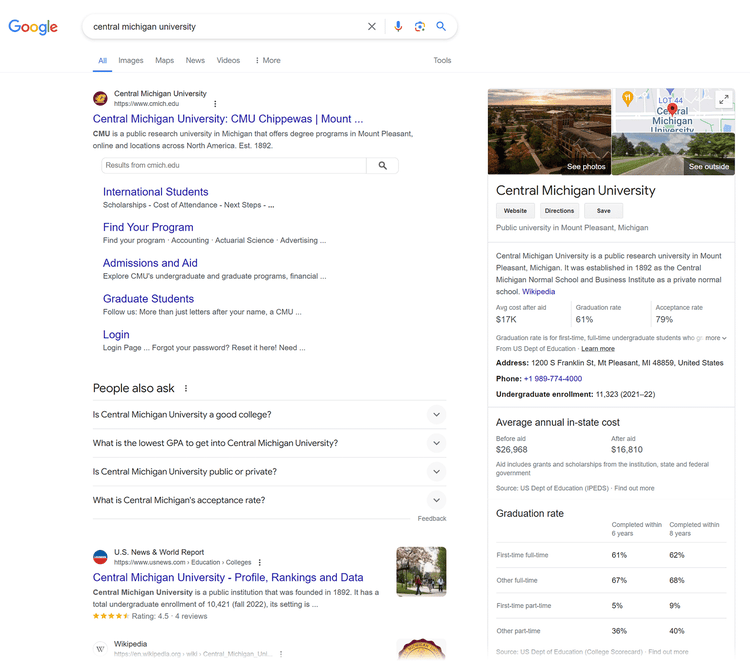
An effective SEO strategy helps your institution see the following long-term benefits:
- Increased online visibility: Many people use search engines to research colleges and universities. Optimizing your site for relevant keywords can improve its visibility on a search engine results page (SERP). This makes it easier for potential students to find you and apply.
- Better credibility: Higher search rankings can enhance your institution's credibility and trustworthiness. Users tend to trust websites that appear at the top of results pages. Leading to increased interest.
- Targeted site traffic: SEO allows you to target specific demographics and geographic areas. This helps your site attract visitors who may be interested in your degree programs.
- Higher enrollment: SEO can impact enrollment numbers. By attracting more qualified visitors to your site, you can increase the number of applications you receive. This could lead to more enrollments.
- More funding: SEO can also impact your institution's funding. Higher enrollment numbers can lead to more tuition revenue. Improved SERP visibility may attract more donations and funding from alumni and other sources.
How SEO Differs in the Higher Education Sector
SEO for higher education presents challenges and opportunities that often differ from other industries due to the audience and content strategy.
Niche Targeting
Your institution likely targets a specific audience. Based on factors like academic programs, location, and student demographics.
To attract qualified leads, you need a more targeted approach to keyword research and content creation.
Further reading: Niche Driven SEO Guide: Definition, Benefits, and Strategy Explained
Educational Content
Content plays an important role in higher education. Create informative content that showcases your programs, faculty, campus life, and other selling points.
This content helps with SEO. And engages prospective students.
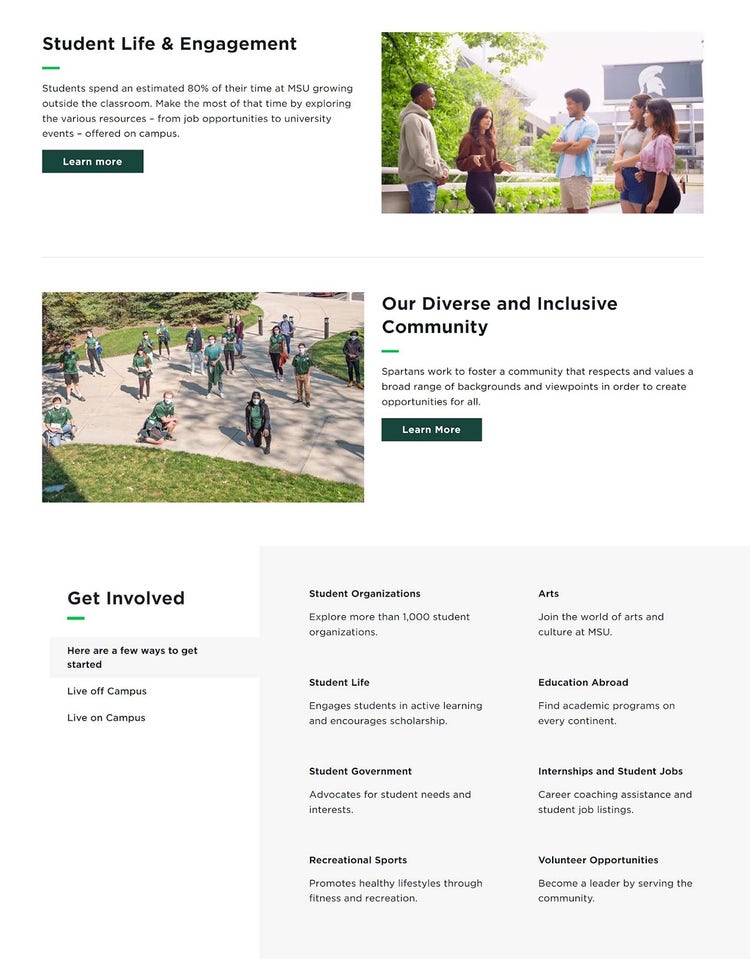
For example, Michigan State University has informative content that readers can use to familiarize themselves with what campus life is like for students.
Academic Credibility
Your institution needs to maintain a strong reputation for academic excellence. This can require creating high-quality content that demonstrates academic expertise.
Earning backlinks from reputable sources, such as government and educational websites, is a ranking factor that can also enhance your credibility.
12 Essential SEO Components for Higher Education
Institutions can improve their visibility in search engine results and attract more prospective students with higher education SEO.
Here are the most essential components of a successful strategy.
1. Perform Keyword Research for Academic Programs
Keyword research can help you identify and target specific terms to attract prospective students looking for academic programs like yours.
Use keyword research tools to find relevant keywords. And get insights into search volume, keyword difficulty, and more.
One such tool to help you discover keyword ideas is Semrush’s Keyword Magic Tool.
Let’s say one of your programs is undergraduate mathematics. Open the tool and enter a broad keyword, such as “math degree.”
Choose the country where your institution is located, and then click “Search.”
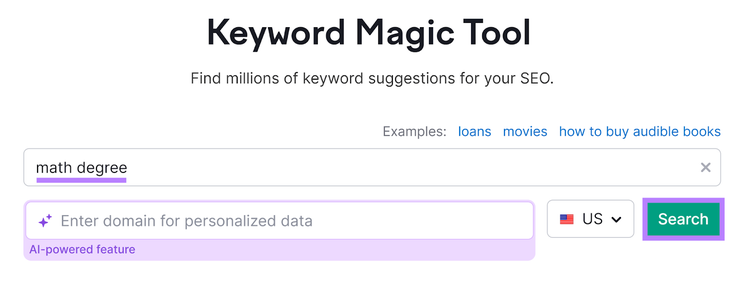
You’ll see an overview of keyword ideas, various metrics, and filtering options.
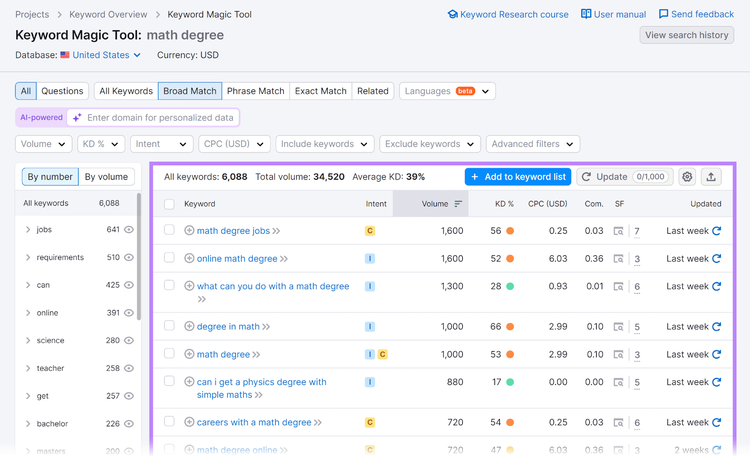
There are more than 6,000 keywords here. Since we’re researching program-specific keyword ideas, we can look for a relevant grouping to narrow our focus to a more digestible list.
In the grouping pane on the left, click “program.”
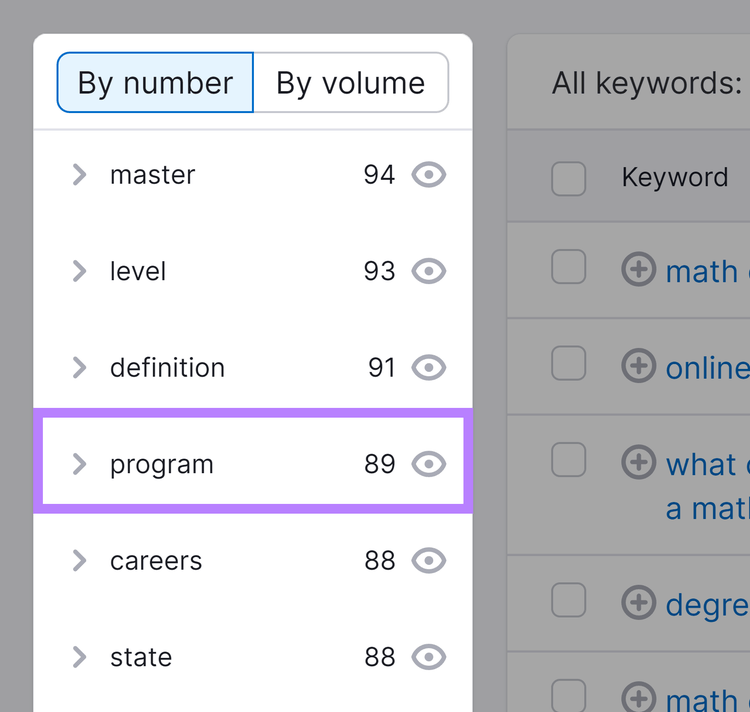
This will return keyword ideas that contain “program.” At this point, you can analyze each term's intent, search volume, and keyword difficulty to determine what you might target.
- Intent is the purpose of a search query
- Search volume is the average number of monthly searches over a 12-month period
- Keyword difficulty shows you how difficult it would be for a site to rank in Google’s top 10 organic search results
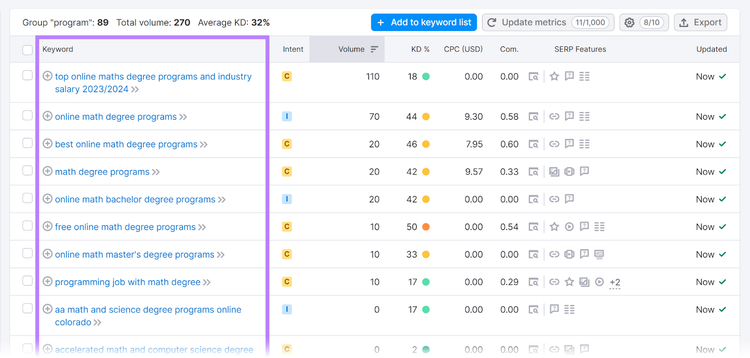
Once you’ve selected keywords to target, use them in various site elements and content to improve organic visibility.
Content
- Homepage: Incorporate keywords in your homepage content. Including headings and messaging.
- Program pages: Use keywords related to individual programs on their respective pages
- Blog posts: Create blog content based on the keywords. Optimize existing blog content where there are opportunities.
- FAQ pages: Include keywords in questions and answers
Meta Tags
- Title tags: Use a relevant primary keyword in each page’s title tag
- Meta descriptions: Use a relevant primary keyword in the meta description
Headings and Subheadings
- H1 tags: Use the primary keyword in the main heading (H1) of the page
- H2, H3 tags: Include related keywords and variations in subheadings to organize content
URLs
- URLs: Create clean, readable URLs that include a relevant keyword. For example, use “university.edu/virtual-mathematics-degree.” Instead of “universityname.edu/page123.”
Internal Linking
- Anchor text: Use a keyword in the anchor text of internal links to help users and search engines understand the relevance of the linked page
Perform Higher Education Keyword Research
with the Keyword Magic Tool
2. Identify Your Target Audience
To define and understand the demographics, interests, and search behaviors of potential students, consider the following:
- Analyze existing data: View enrollment records and website analytics. Look for demographic patterns (age, gender, and location) and interests (academic programs and extracurricular activities).
- Conduct market research: Gather insights via surveys, focus groups, and interviews with current and prospective students. Ask about their online behavior and how they search for academic programs.
- Use analytics tools: Track site traffic and user behavior. Look for trends in which age groups or regions are most active on your site and the pages they visit most.
One tool to gather audience insights is Semrush’s One2Target tool.
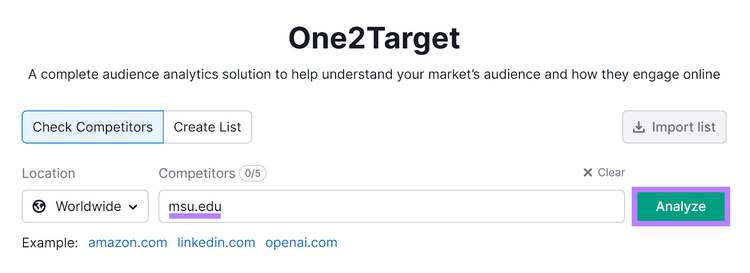
To start, go to the tool and enter a competitor’s domain. For this example, let’s use Michigan State University.
Choose a location—“Worldwide” is the default—and enter the competing school’s domain. Then, click “Analyze.”
You’ll see a demographics overview of your competitor. This includes age and gender distributions, a trend of unique site visitors, and a breakdown of where those visitors come from.
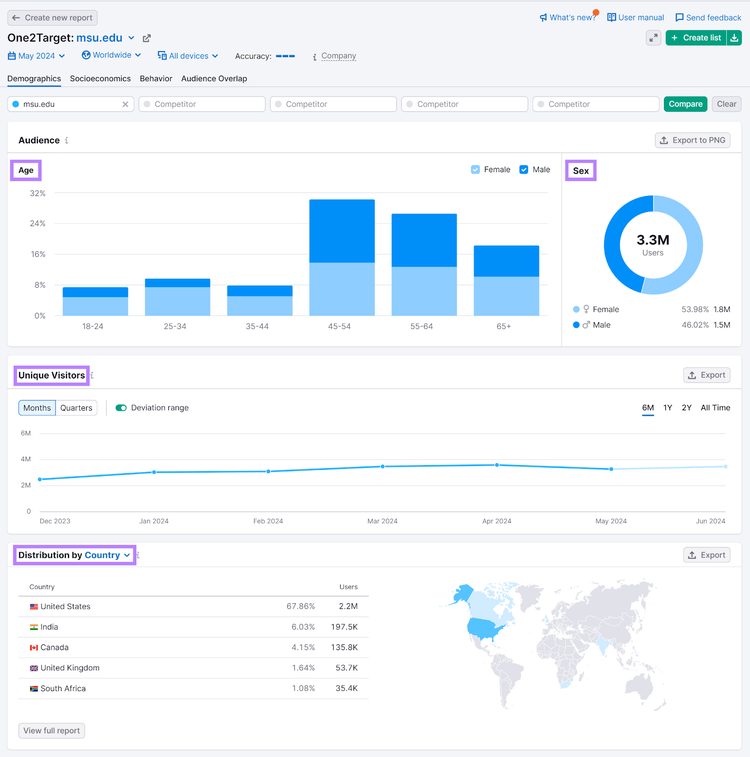
Explore other tabs in this tool, such as “Socioeconomics,” to get insights into household sizes, income levels, and more.
Further reading: How to Do a Market Analysis (Step by Step)
3. Analyze Your Competitors and Their SEO Strategies
To conduct a competitive SEO analysis, start by identifying your main competitors in the higher education space. These could be institutions offering similar academic programs. Or located in the same region.
Find and analyze competitors with the Semrush Organic Rankings tool.
Open the tool and enter a competitor’s domain. Choose a country and hit “Search.”
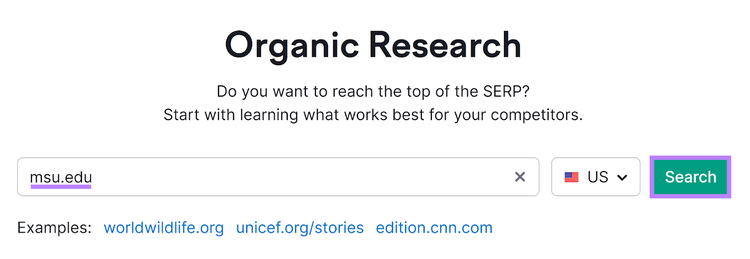
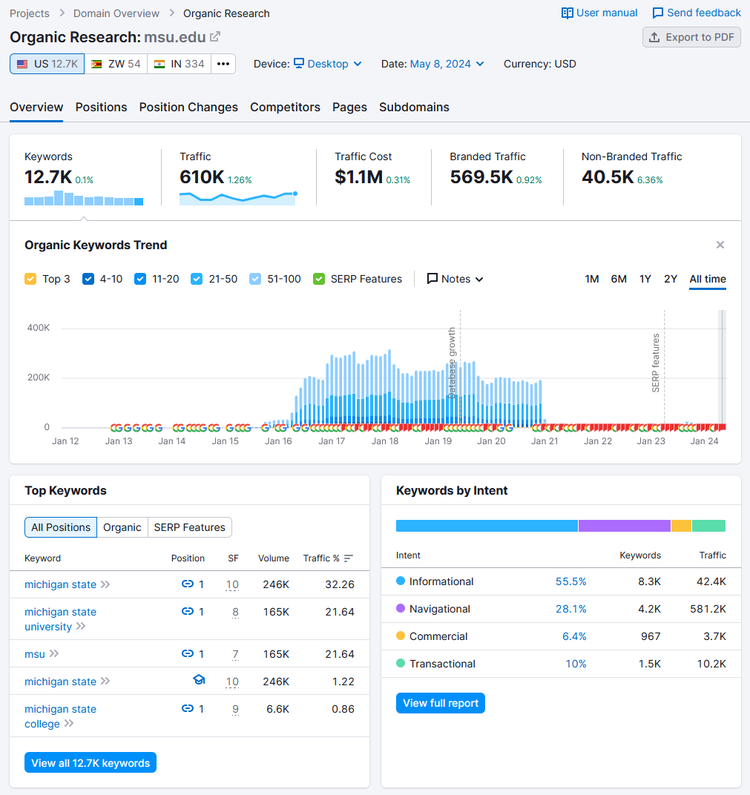
You’ll see an overview of keyword rankings and various traffic metrics.
Note
Many institutions have subdomains dedicated to different programs and departments. Keep in mind that this report will only show data for the exact domain you enter. If you don’t enter a specific subdomain, you won’t see data for it. Semrush treats subdomains as separate entities.
Want to know what keywords the competitor ranks for? Head to the “Positions” tab and scroll to the “Organic Search Positions” section.
This is where you’ll see all ranking keywords, what page they rank for, and corresponding metrics like intent, position, and volume.
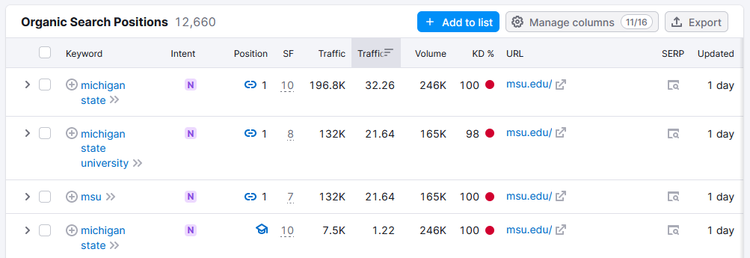
Filter the keywords (such as filtering to show terms containing “program”), URLs, and more.
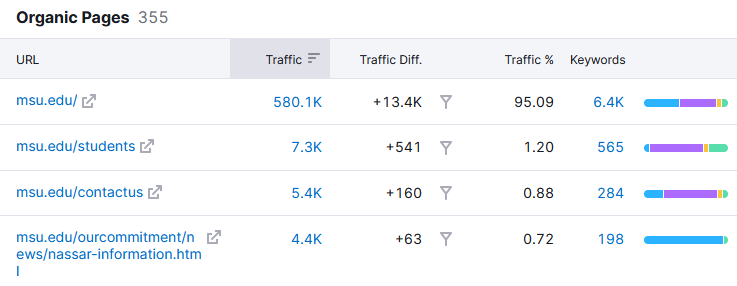
For insights into their top-performing pages, head to the “Pages” tab.
The “Organic Pages” table provides data for estimated traffic, the number of keywords the pages rank for, a breakdown of keywords by intent, and more.
Click on these to see what keywords each page ranks for.
Find more competitors related to the one you’ve entered by heading to the “Competitors” tab.
Here, you’ll see the Competitive Positioning Map, showing the strengths and weaknesses of your competitor’s presence in organic search results.
Below that is the “Organic Competitors” section—a list of domains competing with your competitors in Google search results.
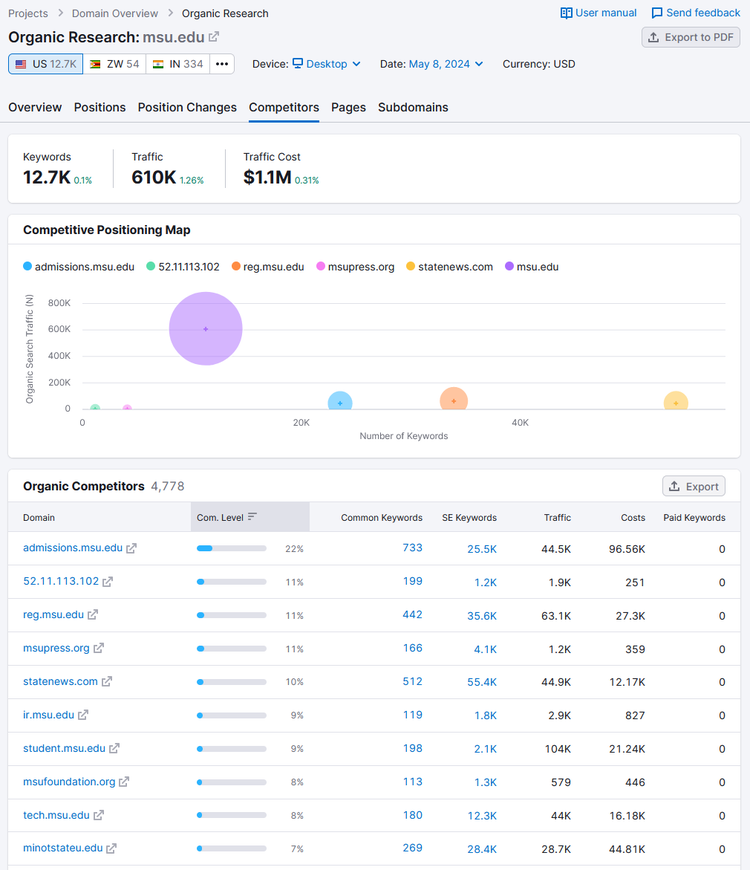
You’ll see data for each domain by competition level, number of common ranking keywords, traffic, and more.
Click on the “Common Keywords” numbers to analyze the keywords that your competitor and the given domain rank for. You might discover some of these sites rank for academic program keywords.
And should be considered an organic competitor.
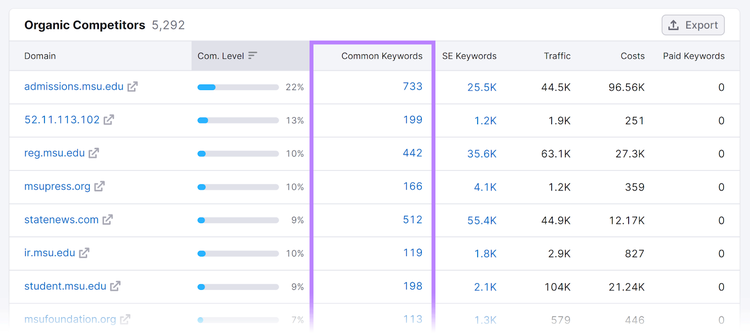
Use these keywords to create high-quality content. And optimize program pages, blog posts, FAQ pages, and more.
To provide value to your audience, boost your search results, and outrank the competition.
Further reading: 9 Competitive Insights and How to Get Them
Analyze Higher Education Competitors’ SEO Results
with the Organic Rankings Tool
4. Create Long-Form Content
Long-form content—typically defined as content that's at least 1,000 words—offers several benefits for higher education institutions.
More Comprehensive Information
Provide in-depth information about academic programs, campus life, facilities, the local area, and more. This can help prospective students make informed decisions about their education.
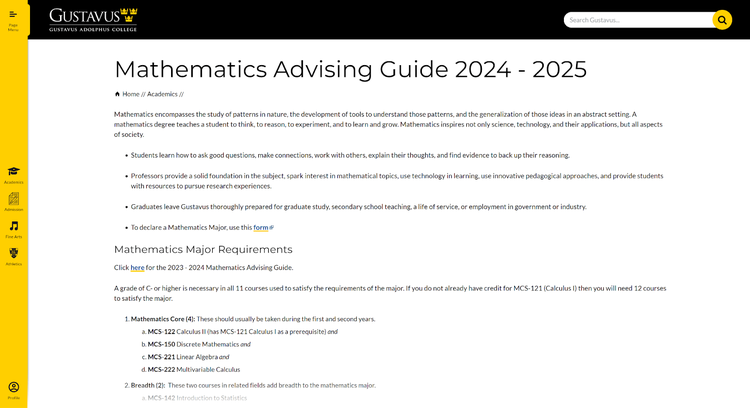
For example, Gustavus Adolphus College has a mathematics advising guide that explains:
- Major and minor requirements
- Course offerings and dependencies
- FAQs
- And everything else a prospective student might want to know about the math department
Further reading: Short vs. Long-Form Content: Which Should You Use?
Higher Engagement
Keep site visitors engaged longer with content that offers helpful insights. Like program requirements, course details, and alumni testimonials.
This can increase the likelihood of prospective students exploring other pages on-site. Or submitting an application.
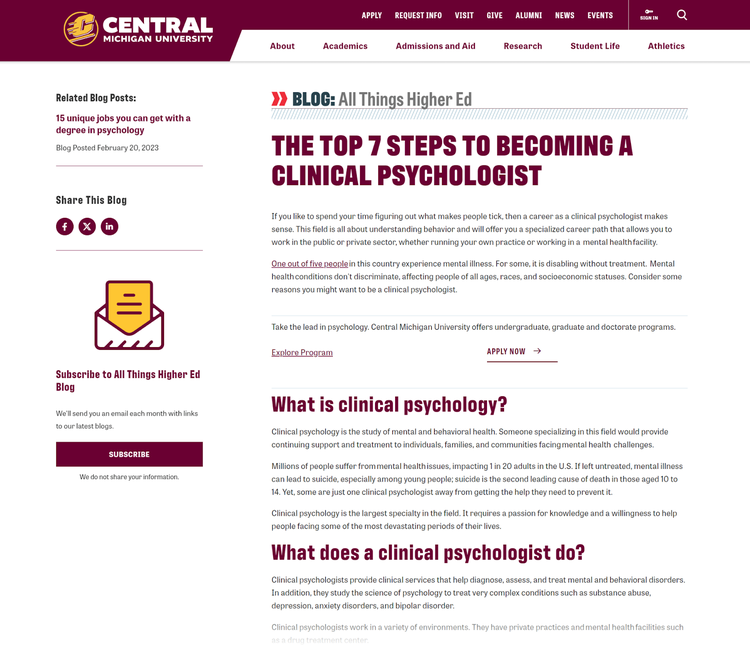
For example, Central Michigan University published a blog post with tips for becoming a clinical psychologist.
The content covers what a clinical psychologist does, the required degrees, and the steps to become one. And includes a CTA to “apply now” to boost enrollments.
Improved SEO
Include more keywords and subtopics in your long-form content to improve its breadth and usefulness. This can help your content rank higher in search results for a wider range of keywords.
This type of informative content also helps attract backlinks from other sites. Which can boost your site's authority and rankings.
Pro tip
Create an SEO-friendly content brief with our SEO Content Template. Enter a keyword or phrase, and the tool will give you specific recommendations based on competitor content already ranking on Google.
5. Optimize Content for Target Audiences
Tailor your content to meet the needs and interests of prospective students.
Understand Audience Personas
Develop detailed audience personas based on demographic information, interests, and goals. Use these personas to guide content creation.
Content ideas might include:
- Program guides: Explain different programs. Including course offerings and admission requirements.
- Campus life blog posts: Share insights into student life, campus events, housing options, and extracurricular activities
- Application tips: Blog posts or videos with tips on how to apply and write personal statements
- Student stories: Videos and written testimonials from current students sharing their experiences
Pro tip
Use our free audience persona tool to design bespoke personas for your university or college. Share the personas with your team to develop more effective marketing and advertising campaigns.
Address Questions and Concerns
Create content that addresses common questions, concerns, and pain points that prospective students may have. Provide clear, detailed answers to alleviate any doubts.
One concern many prospective students have is the cost of attending a college or university. And if financial aid is an option.
Consider creating these types of content to address this concern:
- Cost breakdowns: Articles explaining tuition fees, additional costs, and what’s included
- Financial aid insights: Guides on available scholarships, grants, loans, and work-study programs
- Financial planning tools: Calculators and other interactive tools to help estimate costs
Further reading: 17 Types of Content to Use for Success
Share Student Testimonials
Feature stories and testimonials from current students and alumni. To provide authentic insights into your programs and campus.
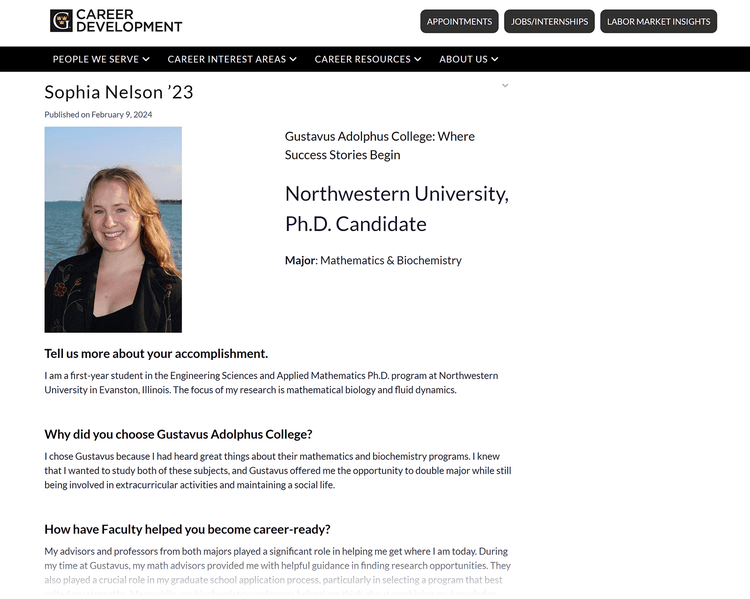
Gustavus Adolphus College has a dedicated section of the site for student stories. Here’s an example of a recent graduate who shares their experience as a mathematics and biochemistry major:
Showcase Unique Selling Points
Highlight your institution's unique aspects. Such as specialized programs, state-of-the-art facilities, or unique campus culture. Emphasize what sets your institution apart from others.
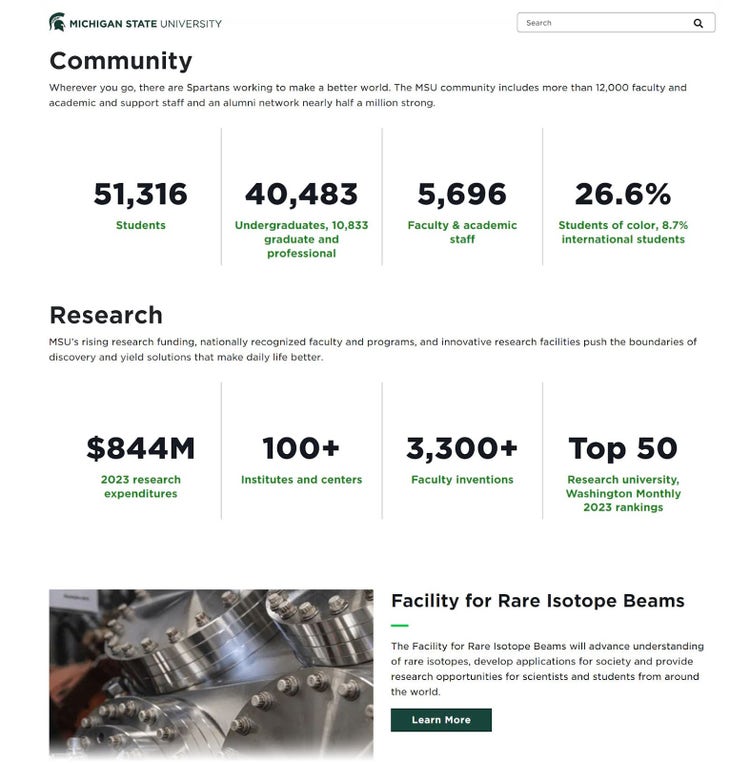
Michigan State University has a page dedicated to facts and selling points as one of the world’s top research universities.
Personalize
Use data and analytics to personalize your content based on user behavior and preferences. Tailor the messaging to individual interests.
And meet prospective students where they are in the decision-making process.
- Example 1: If you see a significant number of visitors from a particular region, create content that highlights the experiences of students from that same region.
- Example 2: If a particular program (such as biochemistry) receives more engagement on your site than other programs, create related biochemistry content about career paths and industry trends.
Pro tip
Check the SEO potential of your content with the SEO Writing Assistant. Improve your content’s readability, save time writing with AI, and ensure everything is optimized.
6. Create Video Content and Useful Images
Multimedia content plays a significant SEO role for higher education institutions.
- Higher engagement: Multimedia content—such as videos, infographics, and interactive elements—can capture the attention of prospective students more effectively than text alone
- Better user experience: Enhances the overall user experience by sharing information in a visually appealing way. This can lead to better engagement and lower bounce rates.
- Increased shareability: People often share multimedia content on social media and other platforms, potentially increasing its reach
- Diversification of content: Allows you to cater to different preferences and reach a wider audience. Some prospective students may prefer watching a video or exploring an interactive tool. Others may prefer reading text.
- Visual storytelling: Enables your institution to tell its story in a compelling way. Visual elements can evoke emotions and convey information more effectively than text alone. This can help create a stronger connection with prospective students.
- Alt text: This is an attribute that describes an image on a page. It appears on the page when it doesn’t load. For SEO, it helps search crawlers understand the image’s context. This is an opportunity to use a keyword if relevant.
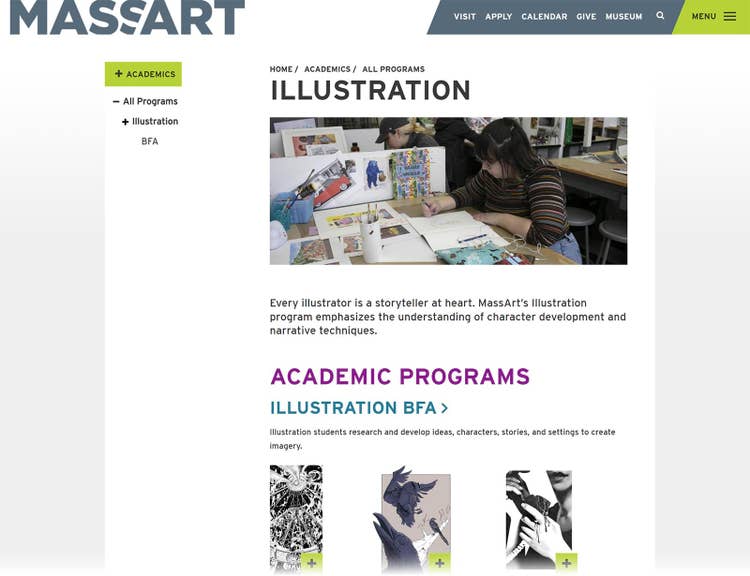
Massachusetts College of Art and Design uses plenty of images and videos throughout its site. This complements program information. And is more engaging than text alone.
7. Ensure Your Site Meets Technical Best Practices
To help search engines crawl and index pages of your website, follow these technical SEO best practices:
Indexability
- Indexing: To get indexed and rank, make sure your site is accessible to search engine crawlers. The index is a database of webpages search engine store for search results. If your pages aren’t in the index, they won’t be returned in search results.
- Robots.txt: Helps you control which pages can and can’t be crawled. Robots.txt is a text file on your site that serves as instructions to inform search engines which pages should and shouldn’t be crawled.
- Canonical tags: Helpful when a page on the site has multiple versions but only one version should be indexed. A canonical tag is an HTML tag you can use to define the primary version of a page that has duplicate pages. It informs search engines which version to index.
- Meta tag directives: Like "noindex" and "nofollow" to prevent search engines from indexing irrelevant or duplicate content.
Crawlability
Make it easy for search engine bots to find and crawl your website’s pages.
- Internal linking: Use internal links to create a logical structure for your site. As higher education sites often have many pages, your most important pages and directories should be accessible within a few clicks from the homepage.
- XML sitemaps: Create XML sitemaps to provide search engines with a list of all pages on the site. There are many sitemap generator tools to help you.
Run Site Audits to Address Technical Issues
Use Semrush’s Site Audit tool to uncover issues affecting your site’s crawlability.
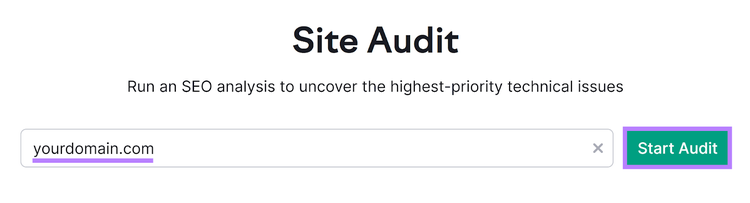
To start, open the audit tool and enter your domain. Then, hit “Start Audit.”
Note
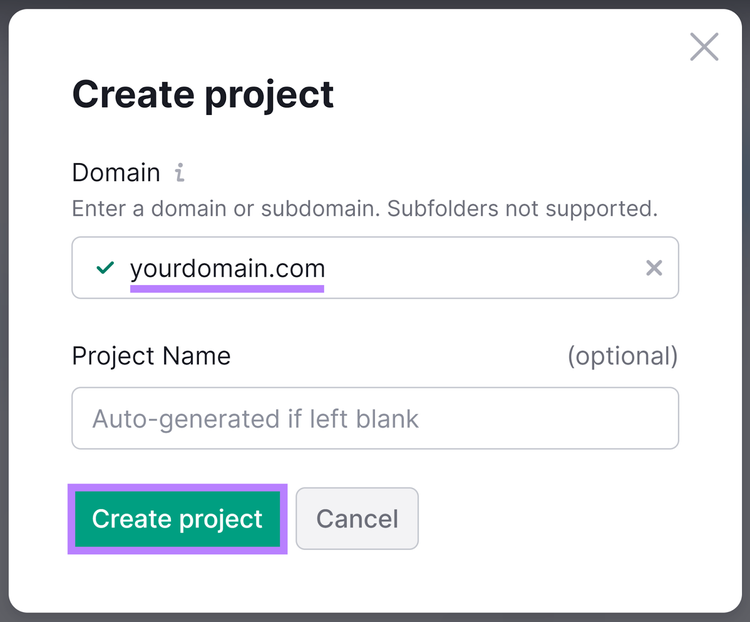
If you have an existing Semrush project, select it or click the “+ Create project” button to add a new domain.
Enter an optional project name and click “Create project.”
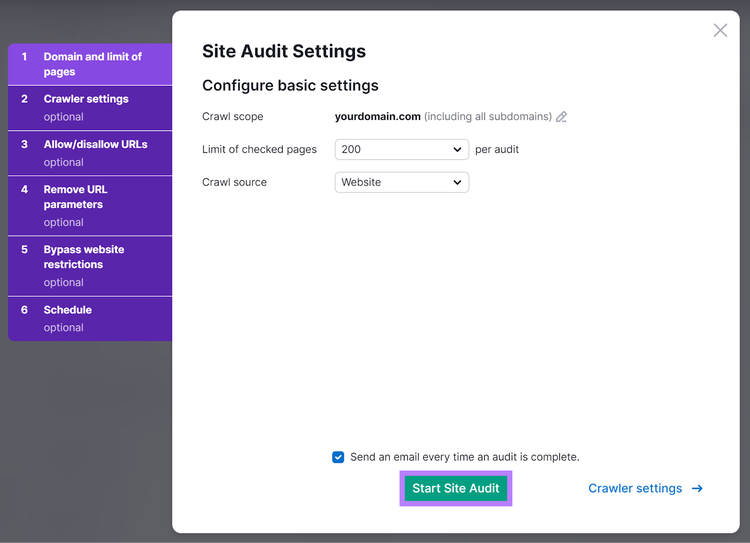
To set up your audit, choose the number of pages you want to check.
Select a crawl source. “Website” is the default, but you also have the option to select “sitemap on site,” “sitemap by URL,” and a file of URLs.
Pro tip
If you need more help, follow the configuration steps in our guide: How to Do a Website Audit.
When you’re done setting up your audit, click “Start Site Audit.”
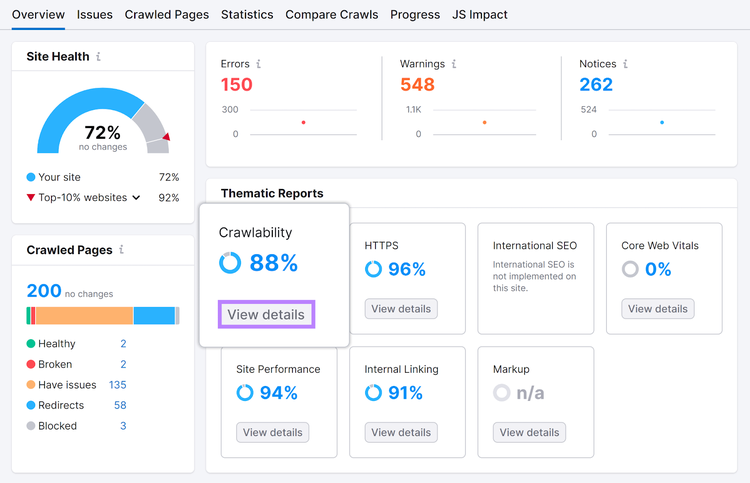
You’ll see a site health dashboard when the audit is complete.
Click “View details” in the “Crawlability” box to find issues with crawling.
Common issues include:
- Broken internal links
- Duplicate content
- 4XX and 5XX status codes
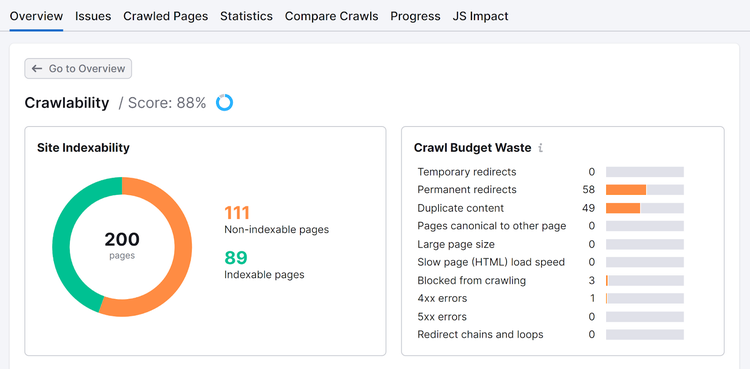
“Crawability” is a report of issues affecting your site’s indexability and crawlability.
In the “Crawl Budget Waste” section, click the orange bars next to each issue to see pages. Crawl budget is how much time search engine bots spend crawling your site.
You don’t want these bots to “waste” time crawling pages with issues. So, you should address those issues here.
Find and Fix Higher Education Website Issues
with the Site Audit Tool
8. Mobile Optimization for Higher Education
Mobile-friendly website design and optimization are essential for higher education institutions.
- Mobile usage: More people access the internet on their mobile devices. A responsive, mobile-friendly site helps make your content accessible and readable on smaller screens.
- Search engine rankings: Google institutes mobile-first indexing to index your pages. And examine your site's performance on mobile devices. A mobile-friendly site is more likely to rank higher in search results, increasing visibility and attracting traffic from mobile users.
- User experience: A mobile-friendly site provides a better user experience. It loads faster, is easier to navigate, and displays content properly on all devices.
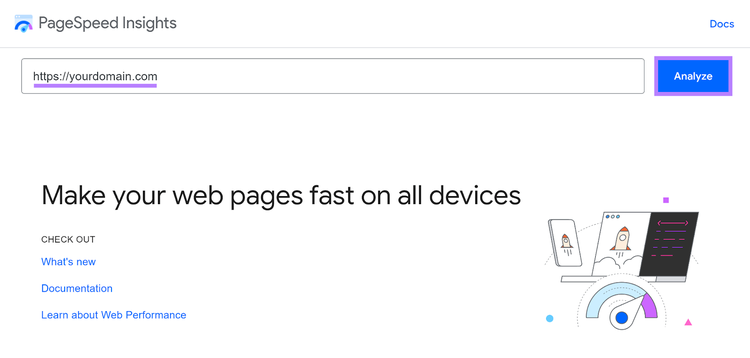
One way to identify opportunities to improve your site’s mobile-friendliness is with Google’s PageSpeed Insights.
Enter a URL into the tool (such as your homepage), and click “Analyze.”
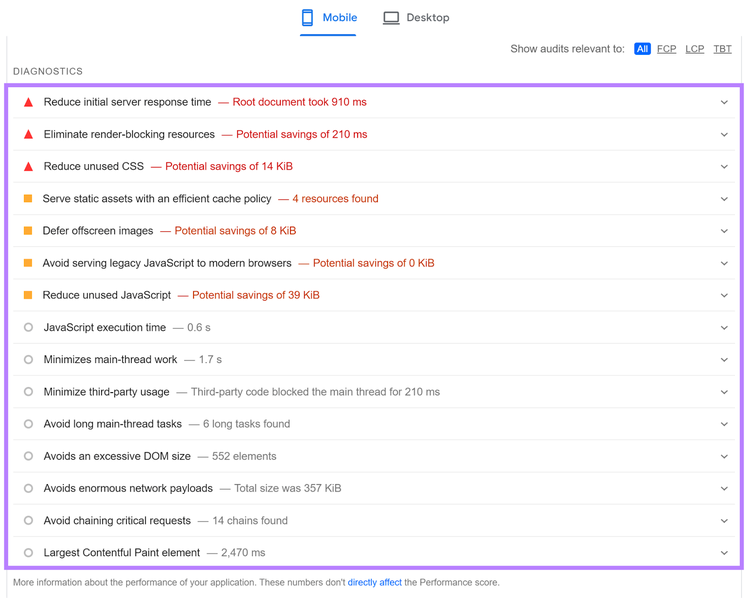
Scroll for suggestions to improve your page’s mobile performance. Such as properly sizing images or reducing unused CSS.
9. Use Google Search Console for Insights and Issues
Google Search Console (GSC) is a free tool to monitor your site’s Google search performance.
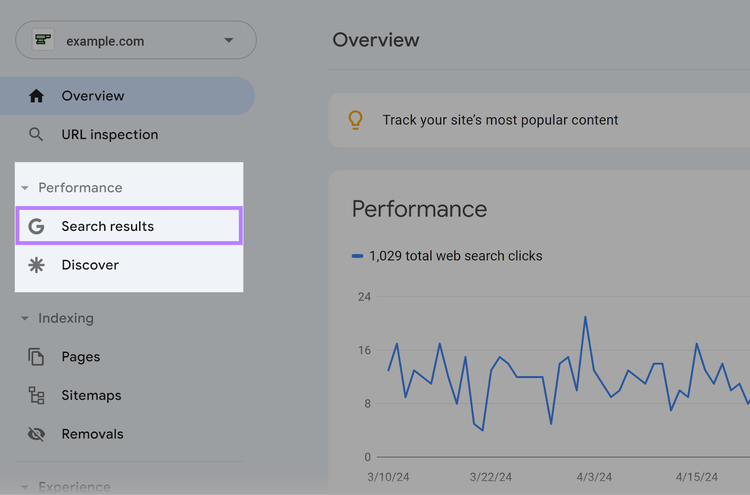
Log in to GSC and select your property (website). Then, click “Search results” in the left-hand menu to access the performance report.
You’ll see Google data for your site. Including clicks, impressions, CTR (click-through rate), and average position (rank).
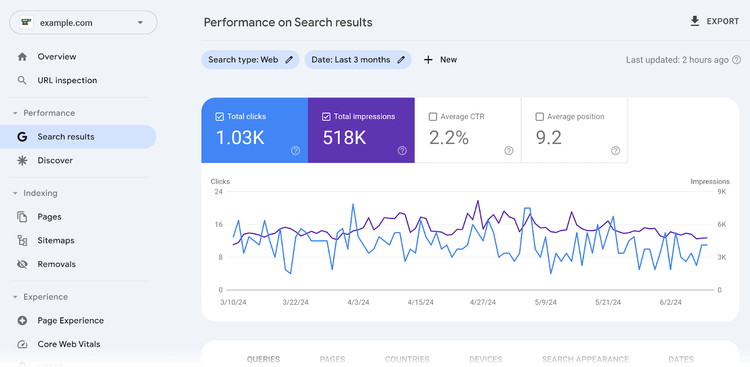
Scroll to see a table of queries (keywords) for which your site receives clicks and impressions on Google.
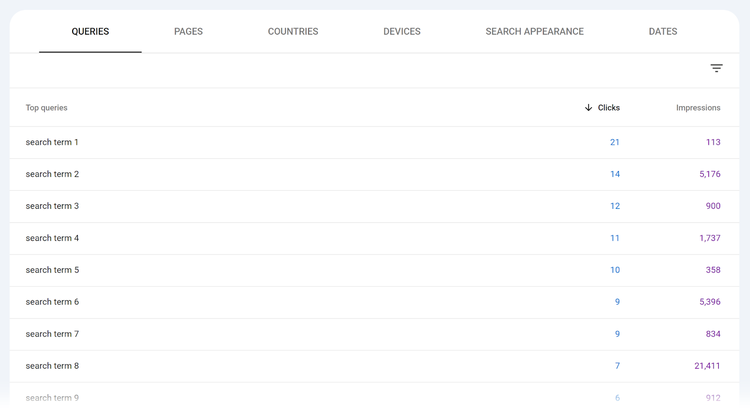
You can also find issues with crawling and indexing your site.
In the left-hand menu, click “Pages.”
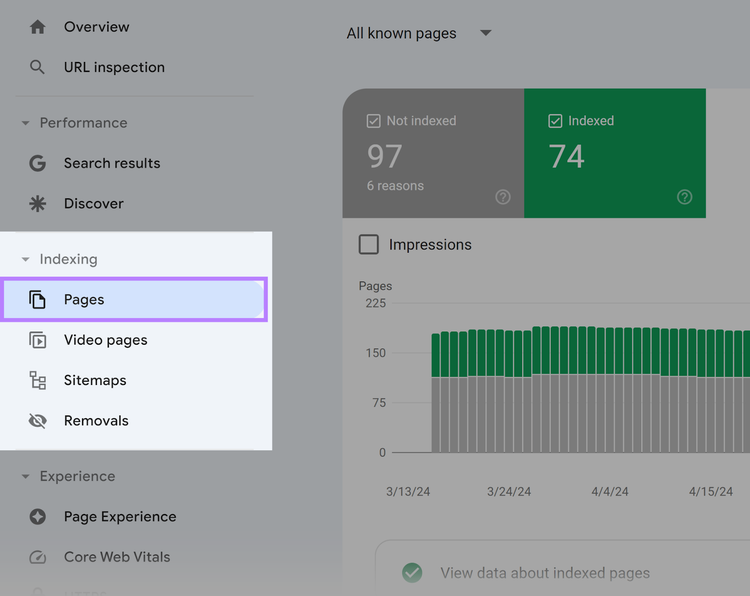
Scroll to “Why pages aren’t indexed” for a list of reasons why Google hasn’t indexed certain pages yet.
Some of these are issues. And others are alerts.
Clicking “Not found (404),” for example, will take you to a list of pages that return a 404 status. You should fix these issues on your site.
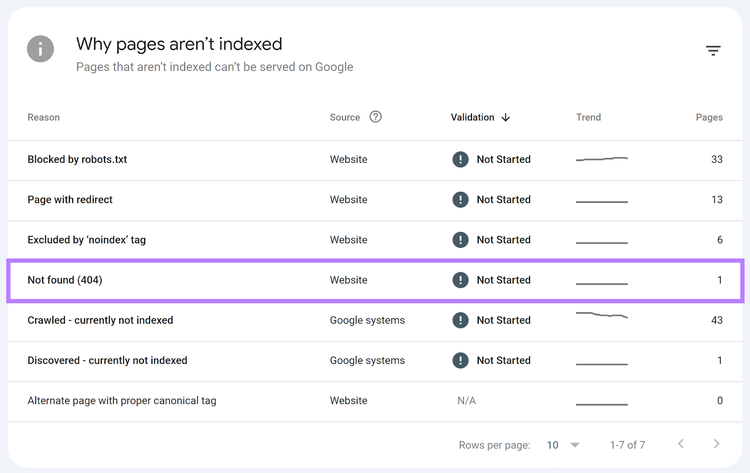
Other reasons listed are alerts, such as “Page with redirect.” The redirects you have in place are likely intentional, and these aren’t necessarily issues.
But you might decide to fix links on your site so redirects aren’t needed.
10. Incorporate Schema Markup
Schema markup, a type of structured data, can enhance your content's presentation on a SERP. The markup provides search engines with additional context about your institution and content.
Including course information, student reviews, program durations, and tuition fees.
Markup can make your search results more appealing and informative.
Here are a few Schema types ideal for higher education sites:
- Course: Provide information about your courses, including course descriptions, prerequisites, instructors, and schedules
- Event or EducationEvent: Highlight upcoming events, webinars, and lectures. Include details such as dates, times, locations, and registration information to make it easier for people to discover and attend.
- EducationalOrganization: Provide information about the institution itself, such as its name, location, contact information, and acceptance rate
- FAQ or QAPage: Mark up frequently asked questions (FAQs) and Q&A content. This can result in the questions and answers appearing directly in search results as quick responses to people’s queries.
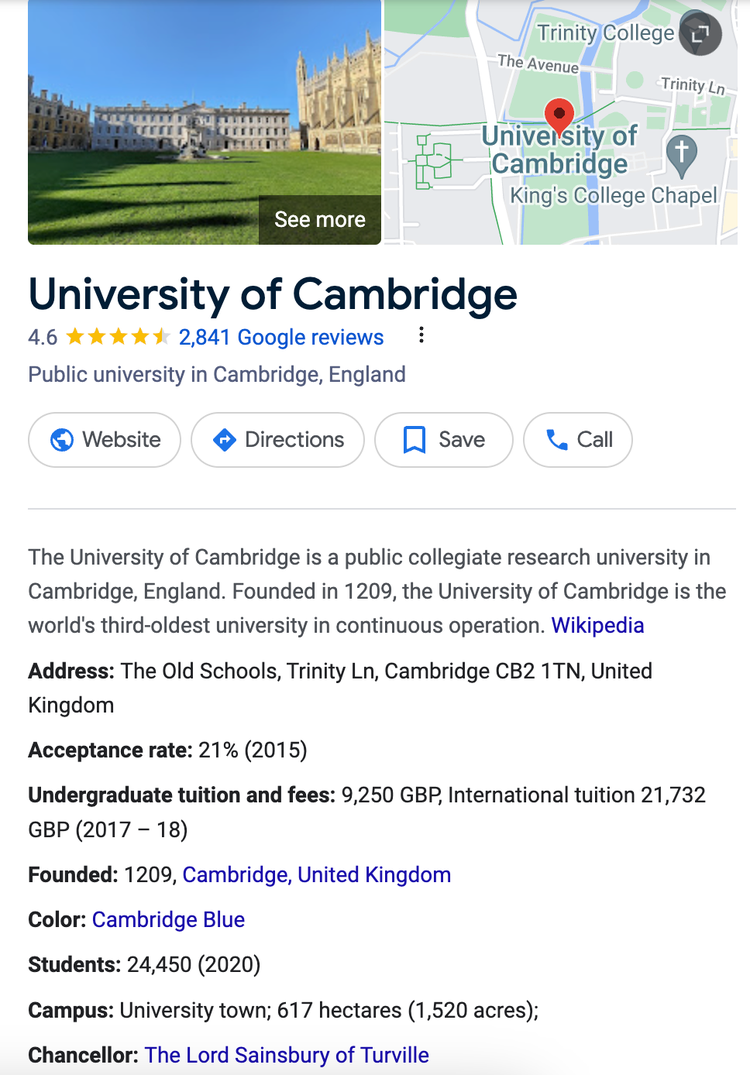
For example, The University of Cambridge uses schema markup to help important details show up on its Google Business Profile. Like its founding year and aggregated star rating.
11. Optimize for Local SEO
Local SEO helps colleges and universities attract prospective students in the local area.
Localized Content
Use local terminology and keywords in your content, meta tags, and headings. Include the name of your city or region in conjunction with keywords related to your programs.
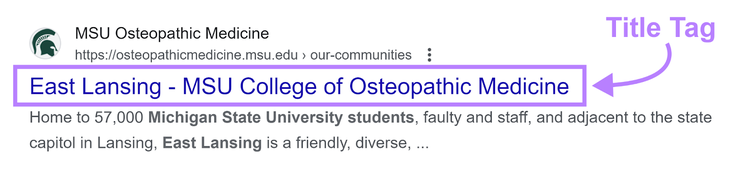
For example, the title tag for this College of Osteopathic Medicine page is “East Lansing - MSU College of Osteopathic Medicine.”
Create content relevant to your local audience. Such as information about attractions and events in the area. This can show that your institution is connected to the community.
And help you rank for local searches.
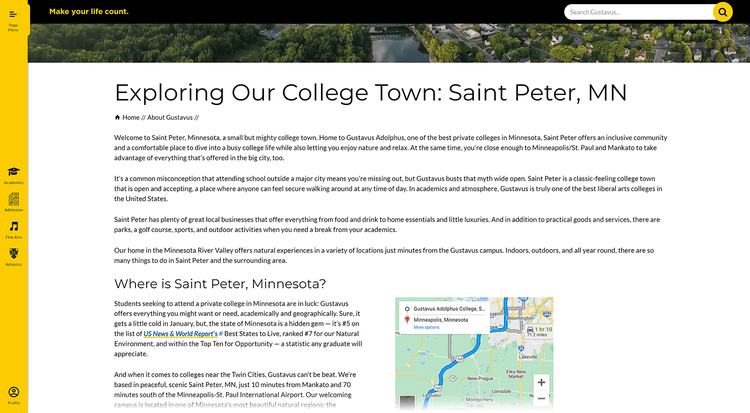
For example, Gustavus Adolphus College has a local page about Saint Peter, Minnesota. The content offers an overview of the town and recommendations for things to do.
Reviews
Encourage current students and alumni to leave reviews of your institution on platforms like Google, Yelp, and Facebook.
Positive reviews can improve your institution's visibility and credibility in search results.
For example, share the unique review link from your Google Business Profile (GBP) to encourage people to leave a Google review. Or ask people to review your institution via email, social media, or text message.
Further reading: How to Ask for Google Reviews: 6 Tips and Examples
Google Business Profile
You can create a GBP for your institution, but Google has likely created an unverified one for you already. In this case, claim it right on the SERP.
Complete your listing fully and accurately. Include your institution's name, address, phone number, website, amenities, and more. Use the most relevant business category (university, private college, etc.).
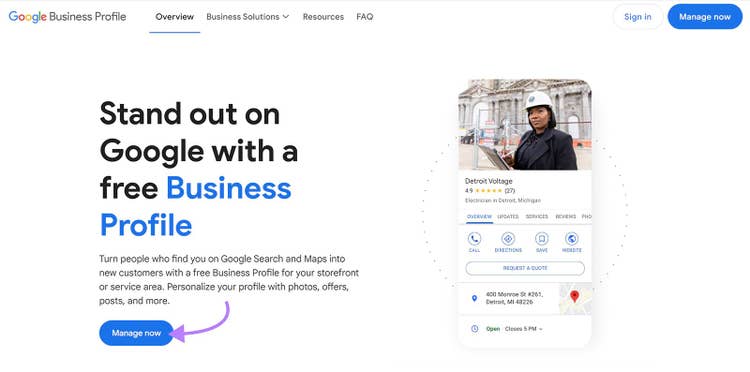
To create or claim a profile, go to the GBP page. Then, click “Manage now” and follow the steps.
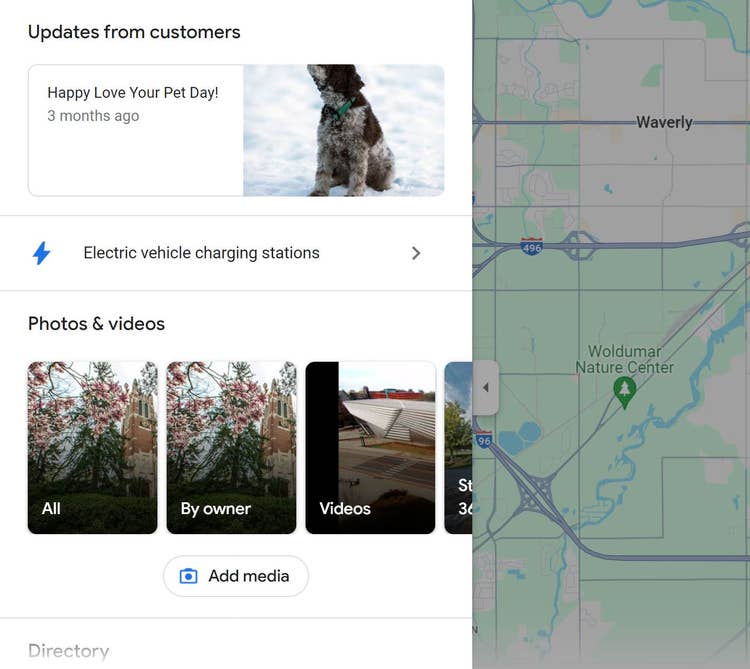
For example, Michigan State University’s GBP features an aggregated star rating and its address and phone number.
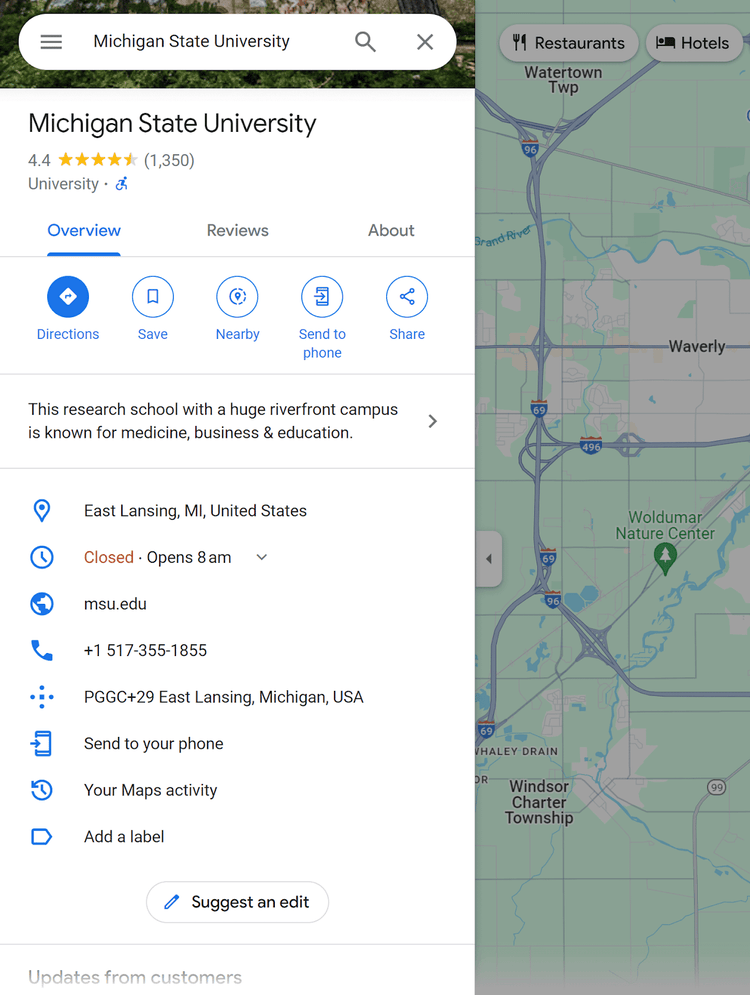
The university also shares photos and videos on its GBP to engage prospective students. And show them the campus and surrounding area.
Further reading: How to Add Your Business to Google
12. Build Authority Through Backlinks
Backlinks help higher education sites reinforce their authority and credibility.
- Guest blogging: Contribute guest posts to reputable sites and blogs either related to your programs or your region
- Scholarships: Offer scholarships to students and promote them on scholarship sites
- Alumni outreach: Ask alumni to link back to your institution's site from their personal or professional sites
- Faculty contributions: Encourage faculty to contribute articles and research papers to reputable sites and publications in their field
- Partnerships: Build partnerships with other educational institutions, organizations, and businesses. Collaborate on projects, events, or research initiatives.
- Local media: Offer to provide expert commentary or contribute articles to local media outlets
- Resource creation: Create valuable resources—such as guides, tutorials, or research papers—that other sites in the field of the given topic will find useful and link to
Use our Backlinkstool to see which sites are linking to your competitors.
Open the tool and enter your competitor’s domain. For this example, we’ll look at Michigan State University again. Then, click “Analyze.”
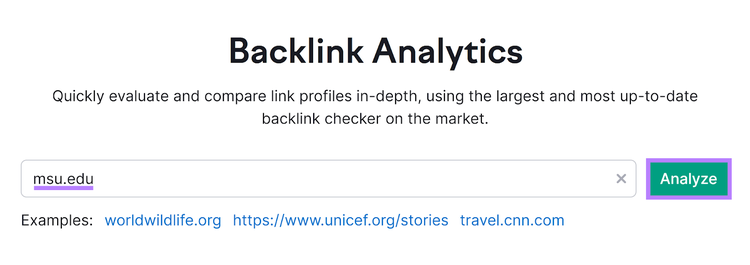
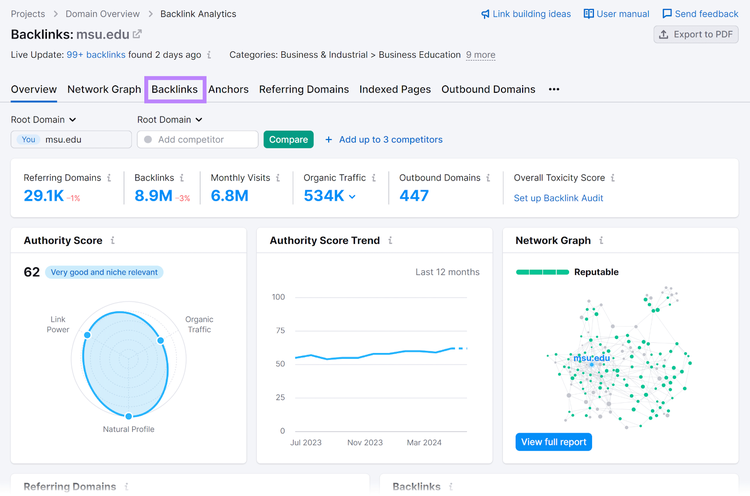
You’ll see an overview of the domain’s backlink profile. To see what backlinks they have, click the “Backlinks” tab.
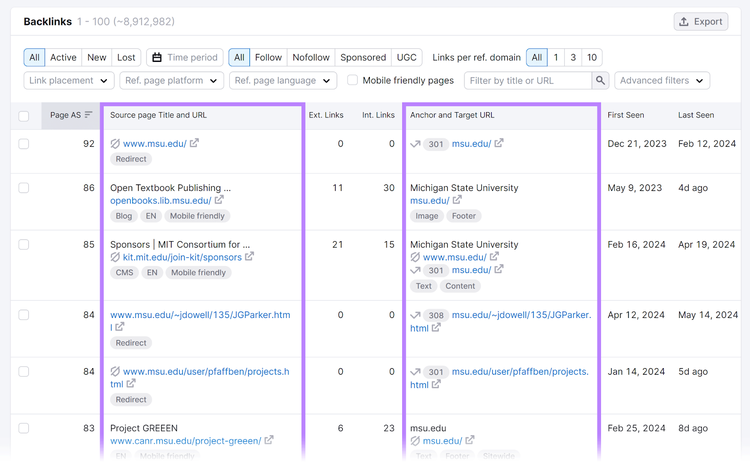
Scroll to the “Backlinks” table to see all individual backlinks pointing to the competitor’s domain.
View the source page of the backlink, the anchor text of that link, and other information. Factor this information into your backlink strategy.
Reach out to the top sites linking to your competitors and ask them to link to your high-quality content.
How to Measure Your SEO Strategy
Evaluate the effectiveness of your higher education SEO strategy using a variety of metrics and tools.
Here are some of the most important key metrics:
- Organic traffic: Monitor the amount of visits (traffic) coming to your site organically from search engines
- Conversion rates: Track the conversion rates of desirable actions on your website, such as form submissions and program applications. This can help you understand how well your site converts organic visitors into leads or applicants.
- Keyword rankings: Track the rankings of your target keywords over time to assess your SEO efforts and identify page opportunities for optimization. Use the Semrush Position Tracking tool to do this.
Further reading: How to Track & Measure SEO Performance
Build a Scalable Higher Education SEO Strategy
An effective SEO strategy includes many components. Including keyword research, content creation, technical SEO, and local SEO.
Optimize your institution’s site for search engines and prospective students by leveraging tools like the keyword tool, Organic Rankings, and Site Audit.
To gain insights into how to best optimize your site for search engine visibility.
Build a Higher Education SEO Strategy
with a Free Semrush Account

Sydney has been creating content for over 10 years. She has been a writer, content manager and coordinator, editor, and strategist. At Semrush, she’s a blog editor who makes sure each article is as accurate, optimized, and helpful as possible.

Tells Google to show you more from Semrush in AI, Search, and Discover.