
What’s Different About Homepage SEO?
Homepage SEO isn’t the same as blog post or product page SEO. Your homepage serves as the central hub of your brand. It introduces your business, guides visitors to key areas, and creates a strong first impression.
The main SEO goal of a homepage is to rank for branded keywords, like your company name. So people can find you easily in search engine results pages (SERPs).
But today, homepage SEO goes further: A well-optimized homepage can also rank for non-branded, high-traffic keywords and appear in AI Overviews, ChatGPT answers, and other LLM search results.
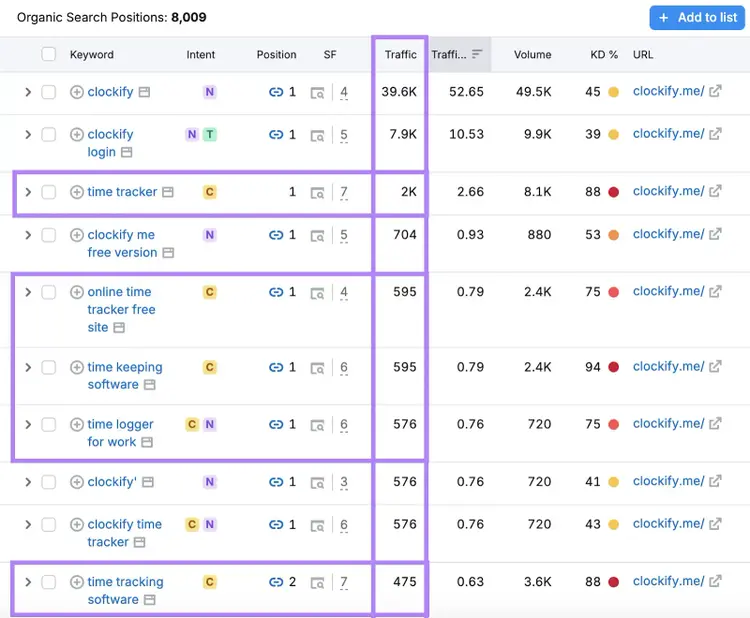
For example, Clockify’s homepage ranks for over 8,000 keywords, including non-branded keywords like “time tracker,” "time tracking software," and "timesheet software."
Each drives organic traffic and matches Clockify’s product: time tracking tools.
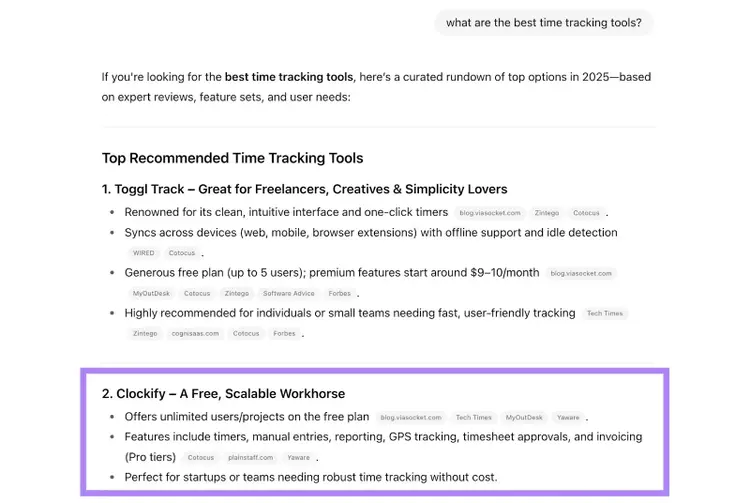
And when you ask ChatGPT for the best time tracking tools, Clockify appears as the second result:
Homepage SEO doesn’t come at the cost of user experience (UX), design quality, or marketing funnel effectiveness. It strengthens them because good SEO aligns with user needs, which improves every part of your homepage.
Let’s explore how to make your homepage rank for more than branded keywords.
How to Optimize Your Homepage for SEO
1. Identify Your Primary Keyword
Your primary keyword is the term that defines your homepage’s focus. It should describe your business, match what people are searching for (known as search intent), and help them find what they need.
With effective homepage SEO, your site can also rank for dozens—or even hundreds—of related terms.
But first, you need to choose the right primary keyword.
Ask these key questions before deciding:
- Is your homepage already ranking? If it performs well for valuable terms, extra optimization may not be needed. Poor optimization or targeting the wrong terms can hurt rankings.
- What does your sales funnel look like? Content-driven sites often rely on posts for traffic and conversions. SaaS businesses, service providers, and local businesses can use the homepage as a main landing page.
- Are you planning to expand? A location-specific keyword like “plumber in Seattle,” can work for now. But it limits growth if you expand to other regions or offer additional services in the future.
- What are your competitors doing? Check search results for your target keywords. If competitors rank their homepages, consider doing the same. If they rank service pages instead, consider following that model.
Answering these questions can help you develop a keyword strategy that supports your business goals.
Next, brainstorm terms that clearly describe your business.
For example, a site builder tool might use “website builder,” “create a site,” or “website building tool.”
Next, review competitor sites.
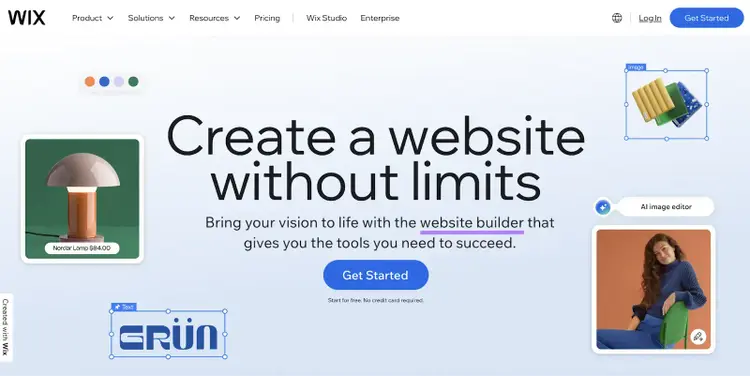
Wix, for example, uses "website builder" on their homepage.
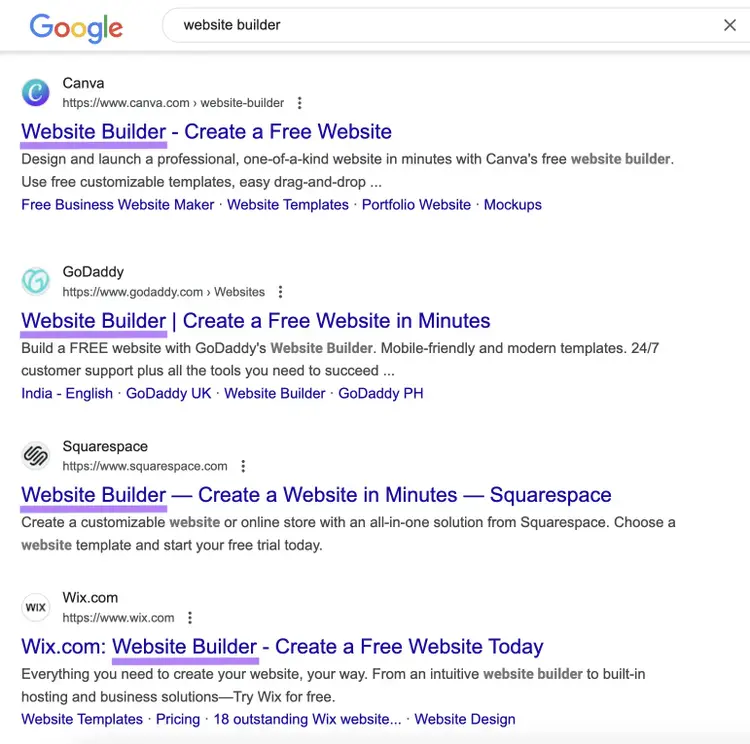
A Google search for “website builder” shows Wix, Canva, Squarespace, and Weebly all using this term in their title tags (more on these soon).
This suggests that "website builder" is a strong primary keyword that matches common, relevant searches.
Next, refine your keyword strategy with our free keyword tool.
Start by entering a seed keyword into the tool and clicking “Search.”
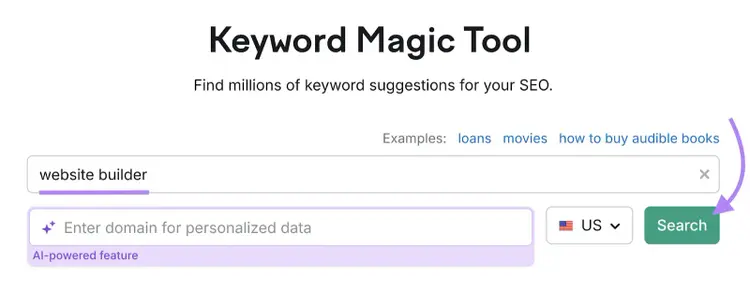
For example, entering “website builder” in the the tool generates thousands of related keywords:
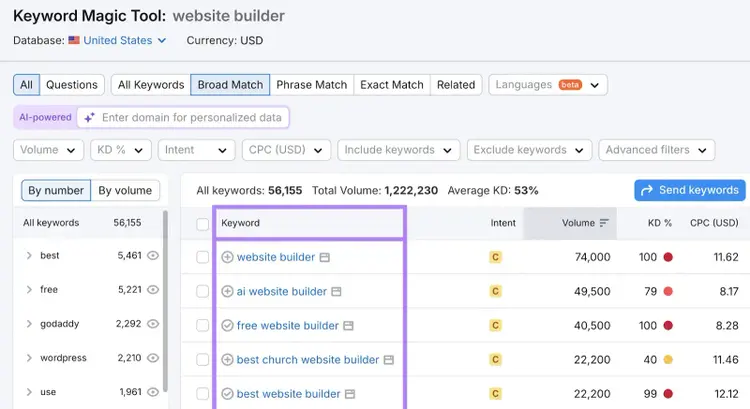
Focus on keywords that are relevant to your business and not overly narrow.
For example, unless your product is only for churches, “best church website builder” likely isn’t the best primary keyword for your homepage.
Once you have a list of potential keywords, select a primary and secondary keyword:
- Primary keyword: Pick the keyword that best describes your homepage and aligns with user intent. Your primary keyword is often the most relevant keyword with the highest search volume.
- Secondary keywords: Choose related phrases that complement your primary keyword. These help your homepage rank for variations and increase its visibility in SERPs, while also providing Google and your users with more context about your website.
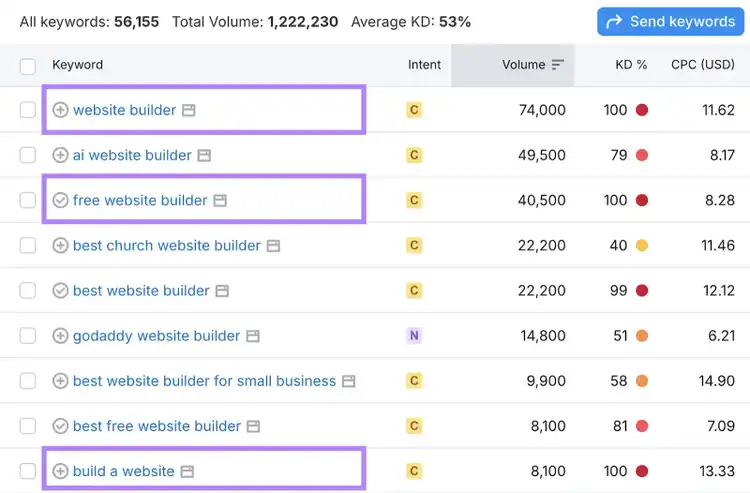
Using Semrush’s Keyword Magic Tool, you might find that “website builder” is your best primary keyword, while “free website builder” and “build a website” serve as strong secondary keywords.
Perform Keyword Research
with the Keyword Tool
2. Optimize Your Homepage’s Content
Optimizing your homepage content for primary and secondary keywords helps search engines and LLMs better understand your site. It also ensures visitors quickly grasp what your business offers.
Here are the key areas to optimize:
Title Tag and Meta Description
Your title tag and meta description help search engines understand your page and give users a preview of what to expect because Google often displays them in SERPs.
- Title tag is the clickable headline in the SERPs. Include your primary keyword and brand name. Keep it clear and descriptive.
- Meta description is a short summary that can appear in SERPs below the title tag. It tells users what your page offers. Use secondary keywords naturally and make the description engaging to encourage clicks.
Note
Google sometimes chooses its own title tag and meta description to display based on your page’s content. However, they’re still worth optimizing to improve your SEO and potentially boost your click-through rates.
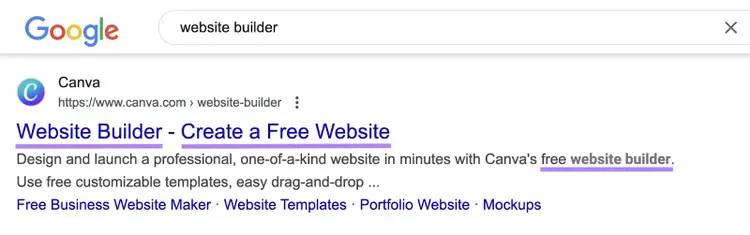
For example, Canva uses their brand name plus primary keywords like "website builder," and secondary keywords (like “create a free website” and “free website builder”) in their title tag and meta description to maximize visibility and drive clicks:
Headings and Body Content
Clear headings and structured body content helps users navigate and makes it easier for search engines to understand what your page is about, potentially leading to more visibility in search results.
Headings and body content are defined by HTML tags that create a content hierarchy:
- H1 (main heading): Use a short, clear headline that includes your primary keyword and states what your business does. Use only one <h1> per page.
- H2, H3, H4 (subheadings): Use these to break content into sections and naturally include secondary keywords. H2s introduce sections, while H3 and lower add subsections.
- Body content (<p>): Aim to place your primary keyword in the first 100 words of your body content (ideally sooner). Also use your secondary keywords naturally throughout the text.
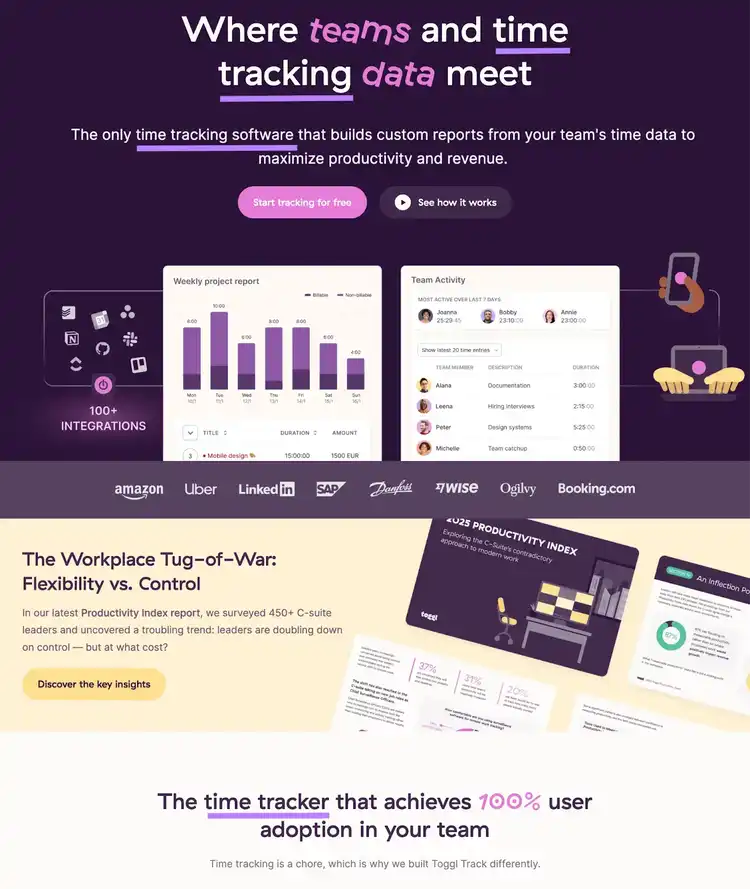
Toggl Track’s homepage is a great example of effective headings and content:
- The H1 clearly conveys the product’s purpose (time tracking for teams)
- Subheadings contain secondary keywords and create scannable sections
- The body text integrates keywords naturally while highlighting key benefits
To streamline content optimization efforts, use Semrush’s On-Page SEO Checker for actionable insights to improve your homepage content.
After setting up the tool, you’ll land on a dashboard:
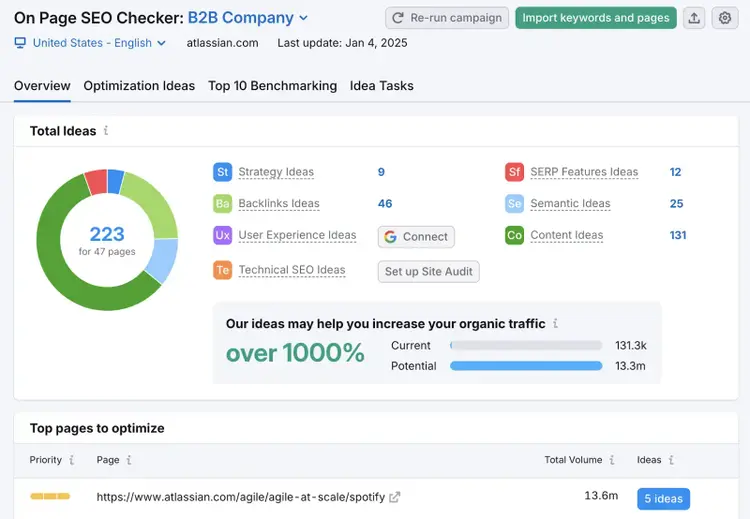
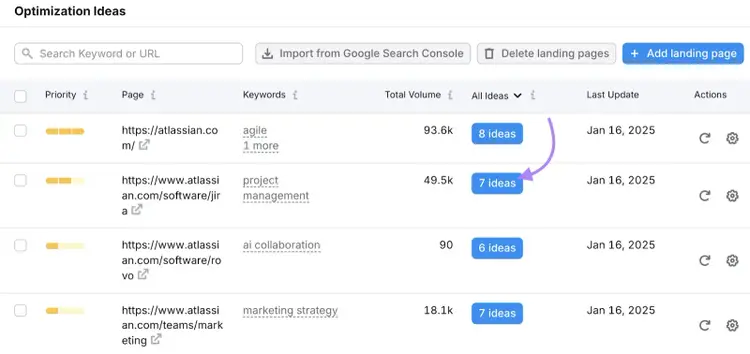
From here, click on pages in the “Top Pages to Optimize” list for specific recommendations. Or head to the “Optimization Ideas” tab for a full overview.
Then click the “# ideas” button next to each page to view detailed suggestions.
The content section checks if you’ve used your target keywords in important areas like the H1 and body text. The tool also flags keyword stuffing.
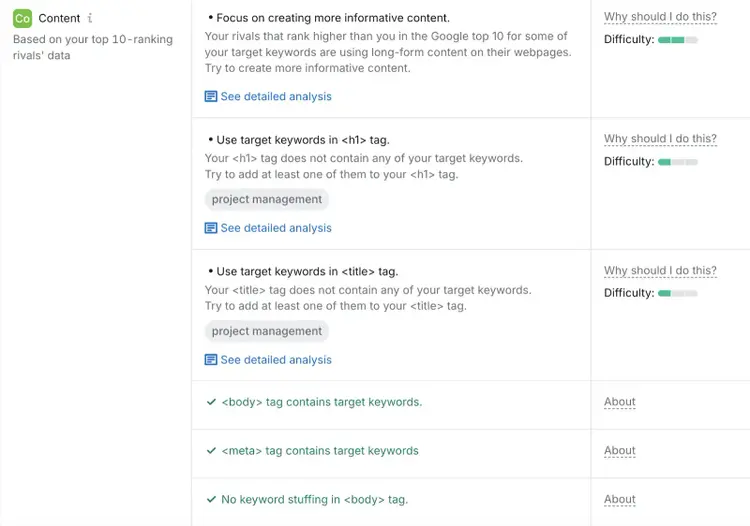
If the tool detects issues, you’ll receive suggestions like this:
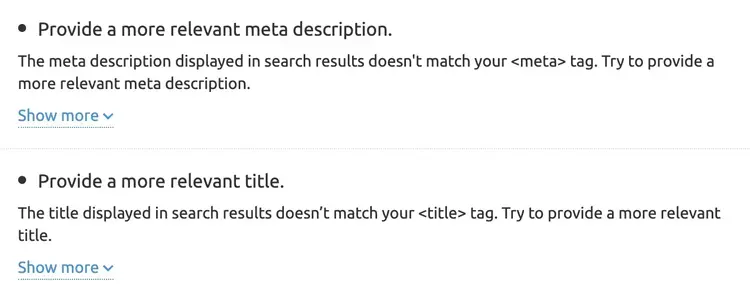
You’ll also receive suggestions for related keywords (also known as semantic keywords) to further optimize your homepage.
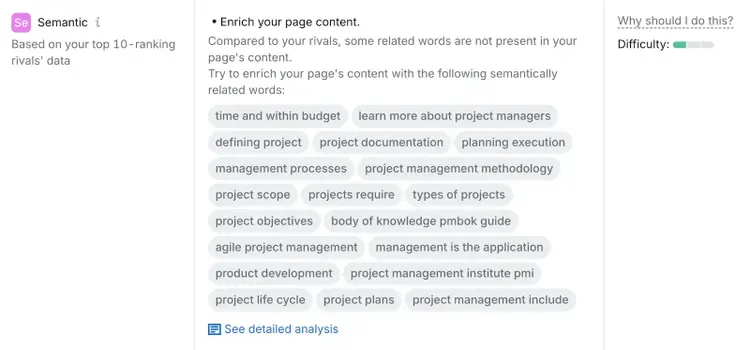
Get Optimization Ideas
with the On Page SEO Checker
Visuals
Visuals (like images and videos) make your homepage more engaging, improve the UX by breaking up text and guiding visitors’ attention, and highlight key points
Without visuals, visitors may feel overwhelmed by blocks of text and miss key product or services benefits.
Use visuals to:
- Reinforce key messages: Place visuals near headings or sections to highlight key points and keep users engaged
- Showcase product benefits: Add screenshots, diagrams, or videos to visually demonstrate how your product works or solves a specific problem
- Make content scannable: Break up long sections of text with images or infographics to make the information easier to digest
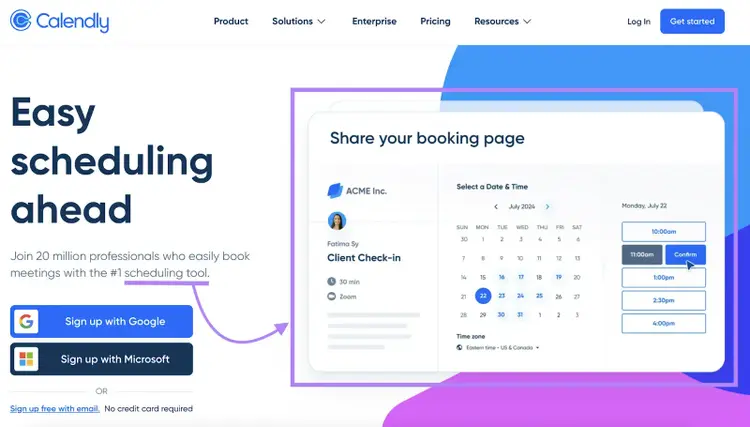
For example, Calendly uses a screenshot of its scheduling interface to show how easy it is to book meetings quickly. Supporting text below the H1 integrates its primary keyword (“scheduling tool”) to reinforce the message.
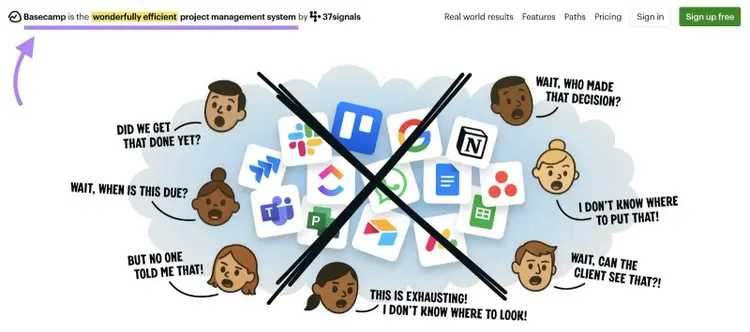
Basecamp, a project management software, uses an illustration to highlight customer pain points.
Plus, they naturally include their primary keyword (“project management system” in the H1 tag in the header of the page, without overshadowing their visual.
Once your visuals are in place, optimize them for search engines by using descriptive file names and alt text. Use keywords in both to help users and search engines understand the content of your visuals.
Also compress your file sizes using tools like TinyPNG or Clideo to maintain quality while improving page speed.
Further reading: Image SEO: How to Optimize Images for Search Engines & Users
Structured Data
Structured data, also called schema markup, is extra code you add to your homepage to help search engines understand the page.
Here’s what it looks like on the backend:
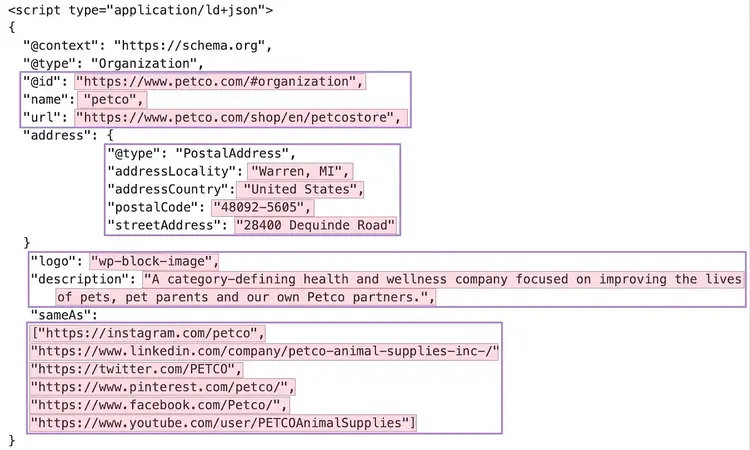
For homepages, organization schema is arguably the most important because it highlights key details about your business, such as business name, address, phone number, website URL, logo, and social media links.
Users don’t see schema, but search engines use it to better understand your site and decide what to display in search results.
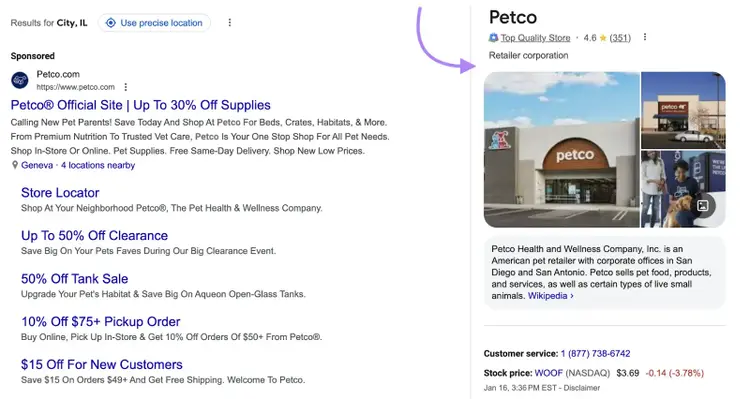
If your business has a knowledge panel (a box that appears in Google search results showing key facts about your business), schema can help refine the information shown.
Like this:
Note
Knowledge panels pull data from Google's Knowledge Graph, which sources data from Wikipedia, Wikidata, LinkedIn, and other platforms. Smaller businesses may not get a Knowledge Panel, and using schema markup doesn’t guarantee you’ll get one.
3. Create a Great User Experience (UX)
Creating a strong user experience (UX) keeps visitors engaged and encourages them to explore your site. Focus on these key areas to improve homepage UX:
Site Navigation
Site navigation, also called site architecture, defines how your pages connect. It guides visitors to the right content and helps search engines understand your site.
Header navigation—the main menu at the top of your site—is critical for seamless UX.
It should:
- Avoid overwhelming visitors with too many options
- Provide clear paths to important pages
- Use descriptive labels so users know where each link leads
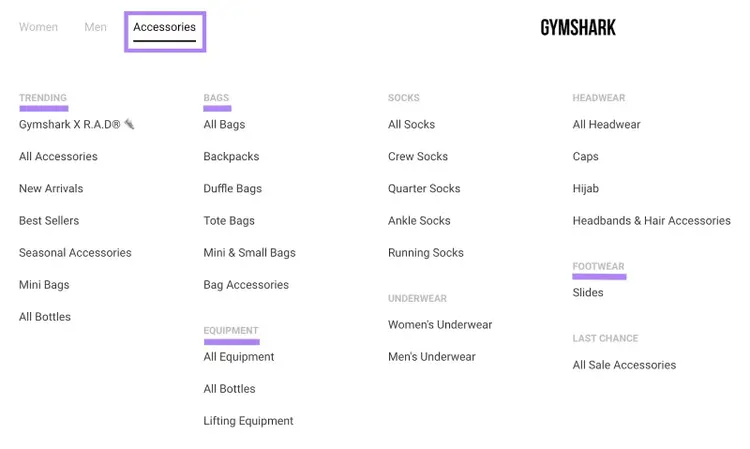
Large sites can use drop-down menus to group content into categories and subcategories.
For example, Gymshark’s header navigation includes a drop-down menu for “Accessories” with clear categories like “Trending,” “Footwear,” “Bags,” and “Equipment.”
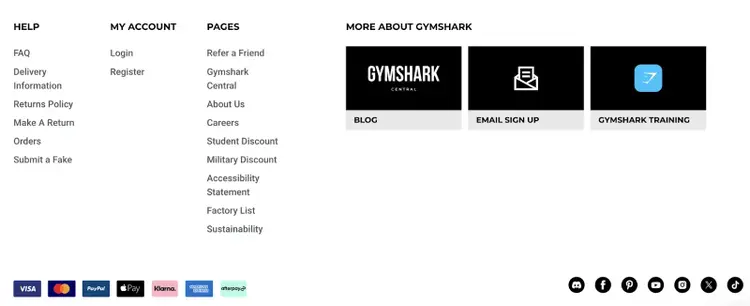
Footer navigation sits at the bottom of your site and works as a central hub for secondary information that doesn’t need to be in the main menu.
Common footer links include:
- Privacy policy, cookies, and terms and conditions
- Contact information and press details
- “About Us” and “Career” pages
Gymshark’s footer organizes links into sections like “Help,” “My Account,” and “Pages.” It adds quick links to customer support, account management, and social media profiles. This ensures visitors can easily find what they need.
Note
Header and footer menus appear across your website, not just on the homepage. But optimizing them as part of your homepage SEO is important because many visitors enter your site through the homepage.
Page Speed
Homepage speed is critical because a fast site prevents user frustration, lowers bounce rates, and can improve rankings.
Google measures site performance with Core Web Vitals (CWV).
These metrics evaluate three areas:
- Loading speed (Largest Contentful Pain): How quickly the largest page element, such as an image or text block, loads
- Interactivity (Interaction to Next Paint): How quickly your site responds when users click, scroll, or type
- Visual stability (Cumulative Layout Shift): Whether the layout stays steady during loading without sudden shifts
In simple terms, CWVs check if your website is fast, responsive, and stable. Google favors fast sites with strong CWV scores, making page speed a key SEO factor.
To improve your homepage’s loading speed and meet CWV standards:
- Compress images: Use tools like TinyPNG to shrink image files without losing quality. Choose modern formats like WebP for faster load times.
- Minimize code: Remove unused scripts and reduce CSS, JavaScript, and HTML files
- Use a Content Delivery Network (CDN): CDNs distribute content across servers worldwide, giving users faster access based on their location
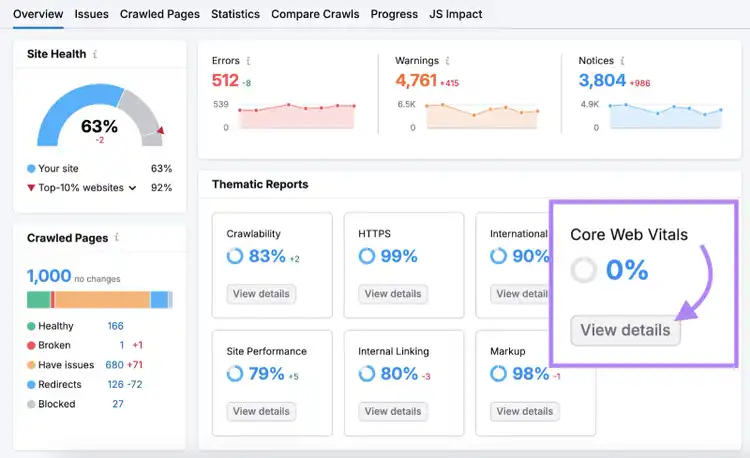
Use the Site Audit tool to check your site’s Core Web Vitals and get tailored recommendations to boost speed and UX.
Fix Website Page Speed Issues
with the Site Audit Tool
Mobile Experience
Google ranks websites based on their mobile versions, a process known as mobile-first indexing. Optimizing your homepage for mobile is essential for both rankings and user experience.
To optimize your homepage for mobile users:
- Create a responsive design: Use responsive web design so your homepage adjusts to different screen sizes and orientations
- Simplify navigation: Add a hamburger menu for compact navigation. Ensure buttons and links are large enough for easy tapping
- Optimize mobile load times: Compress images and avoid heavy graphics or animations that slow mobile speed
- Avoid intrusive pop-ups: Don’t cover the screen with pop-ups. They frustrate users and can harm rankings.
Further reading: The Complete Guide to Mobile SEO: 8 Tips & Best Practices
4. Showcase E-E-A-T
Google uses E-E-A-T (Experience, Expertise, Authoritativeness, and Trustworthiness) to evaluate content quality. The concept comes from Google’s Search Quality Rater Guidelines, a handbook that guides how Google’s manual reviewers assess the quality of search results.
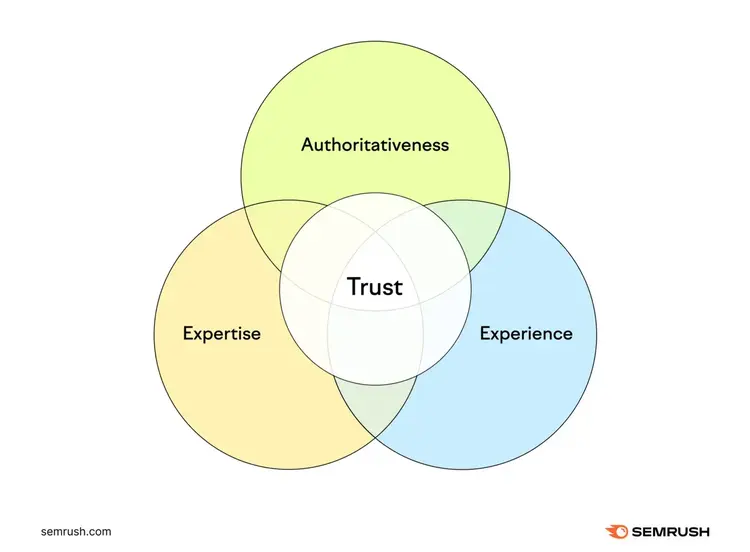
E-E-A-T isn’t a direct ranking factor, but showing strong E-E-A-T builds trust, increases credibility, and improves relevance. Which often leads to more conversions.
To build trust with your homepage content:
- Convey your purpose clearly: State your homepage’s role: introducing your business, guiding users, or showcasing products and services
- Provide key information: Prominently display your business name, contact details, and an overview of offerings
- Show credibility through validation: Add reviews, awards, certifications, testimonials, case studies, or videos
- Simplify user experience: Avoid clutter. Present information that meets user needs quickly
- Avoid deceptive practices: Don’t use clickbait, overpromise features, or mislead visitors. Headlines and descriptions should match what the page delivers.
Pro tip
If your homepage covers YMYL (Your Money or Your Life) topics such as health, finance, or law, highlight credentials, link to authoritative sources, and add strong trust signals (like reviews or certifications). Google places extra weight on expertise and trust in these areas.
5. Add Internal Links to and from Your Homepage
Internal links connect pages within your site. They help users navigate and show search engines how your site is structured.
Your homepage is the central hub of your website, guiding users to key sections and distributing page authority through relevant internal links.
Use internal linking on your homepage to:
- Guide users to key pages: Link clearly to essential pages like “About Us,” “Services,” “Products,” and “Contact Us”
- Feature high-value content: Highlight case studies, blog posts, or products/services directly on the homepage
For example, Petco’s homepage includes a “Top Sellers” section that links to popular product pages:
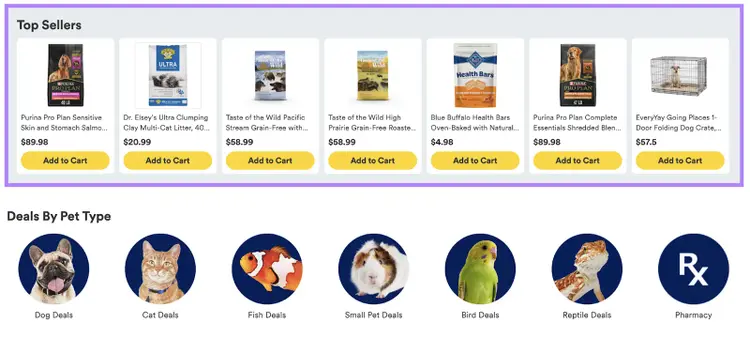
It also highlights top categories for dogs and cats. This makes it easy for visitors to find what they need while boosting visibility for important product pages:
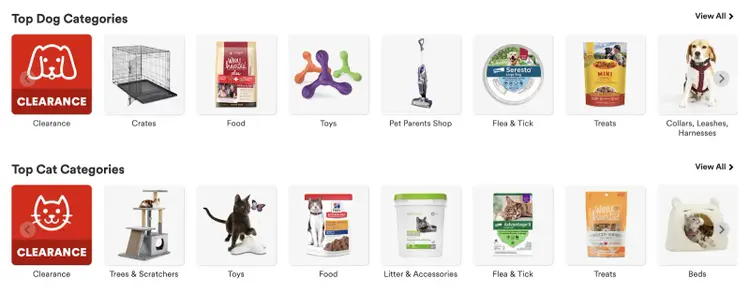
This approach improves user experience by guiding visitors quickly. It also helps search engines better understand which pages matter most on your site.
6. Earn Backlinks to Your Homepage
Earning backlinks from authoritative sites signal to search engines that your site is trustworthy and reliable, which can improve your homepage rankings in search results.
High-quality backlinks also:
- Drive referral traffic from users clicking the links
- Help search engines discover your content faster
- Increase site authority, which supports better rankings
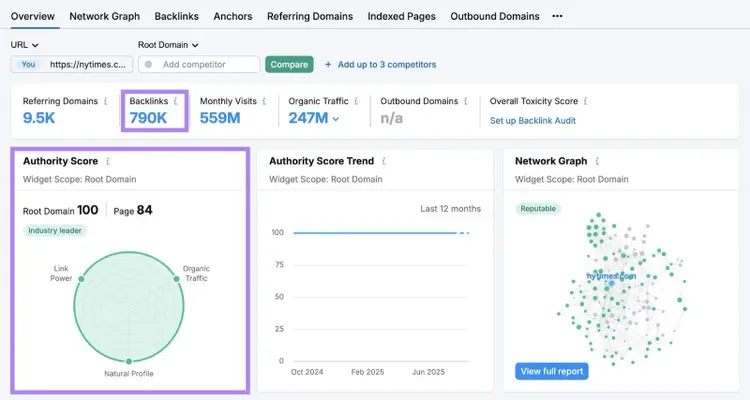
For example, the homepage of nytimes.com has 790,000 backlinks, Including links from reputable domains like bbc.co.uk and microsoft.com.
These backlinks contribute to its high Page Authority Score (84).
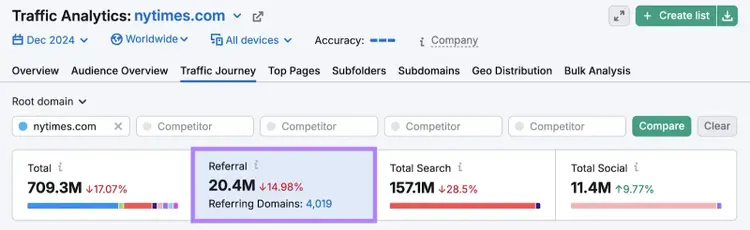
The site also receives over 20 million visits from referral traffic across all backlinks.
Proven methods to earn high-quality backlinks include:
- Digital PR: Get featured in industry news, blogs, or podcasts
- Collaborate with influencers and experts: Ask them to promote your brand and link to your homepage
- Leverage partners, vendors, and clients: Request homepage links on their websites
- Fix broken backlinks: Find links pointing to outdated URLs and ask site owners to update them
For more detail, check out our link building guides:
7. Fix Any Technical SEO Issues
Technical SEO issues can prevent search engines from crawling, indexing, and ranking your site. Fixing them ensures your homepage—and your entire site—runs smoothly for both users and search engines.
Search engines use crawlers to explore your site. If they hit errors, they may not index your content, which can keep your site from appearing in search engine results. That makes resolving technical issues a critical priority.
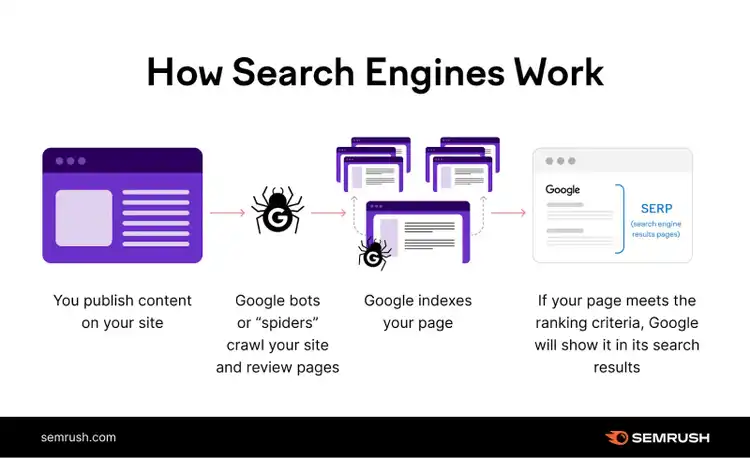
Use Semrush’s Site Audit tool to detect and resolve technical SEO problems.
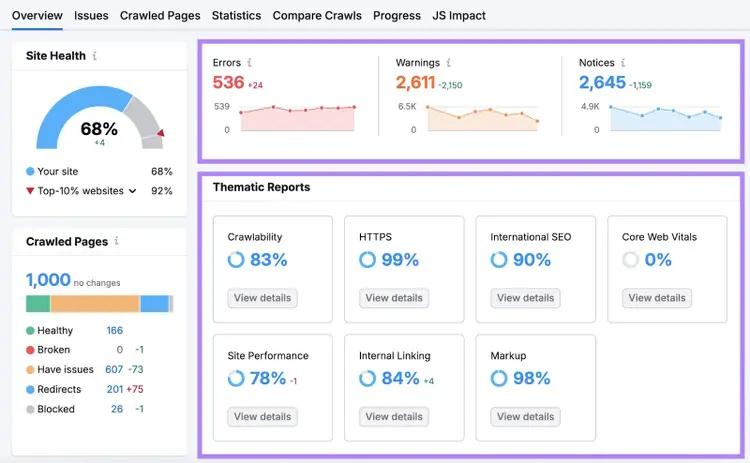
After crawling your site, the tool gives a “Site Health” score from 0 to 100. This score shows your overall technical health and compares your performance with competitors.
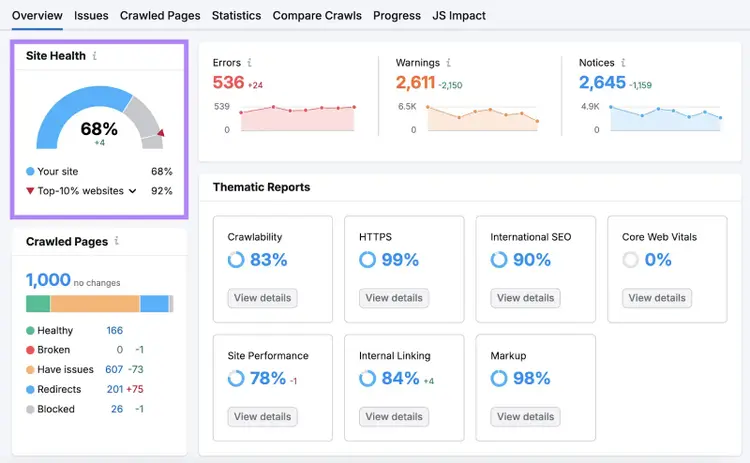
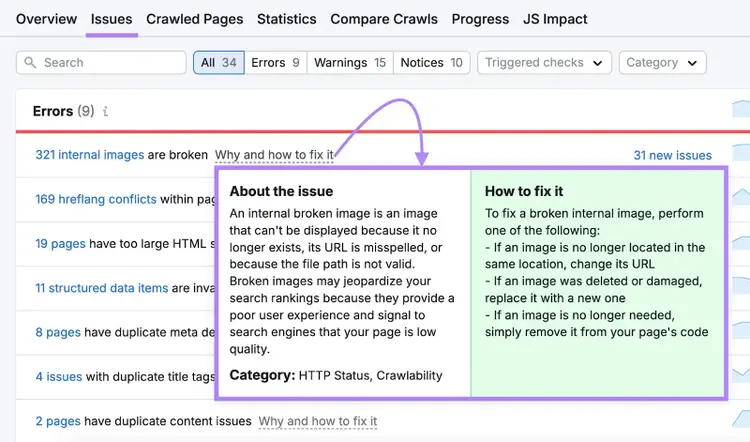
Issues are grouped by severity into “Errors,” “Warnings,” and “Notices.” Thematic Reports let you focus on specific areas of technical SEO for deeper insights.
The “Issues” tab provides a full breakdown of issues, the number of affected pages, and “Why and how to fix it” guidance.
For new sites, run a technical SEO audit immediately to establish a solid technical foundation.
For established sites, audit regularly—monthly if possible, or at least once per quarter. This helps you catch and fix issues before they hurt rankings.
Find and Fix Website Issues
with the Site Audit Tool
Track the SEO Performance of Your Homepage
Tracking homepage performance shows how well it meets your goals and aligns with user intent.
Use Semrush’s Position Tracking tool to monitor keyword rankings across Google, devices, and even AI Overviews.
The tool allows you to:
- Track daily keyword rankings: See your homepage’s performance across search engines, devices, and LLMs
- Analyze competitors: Identify who targets your keywords and compare their rankings, visibility, and traffic to yours
- Group keywords: Organize by topics, campaigns, or goals using tags
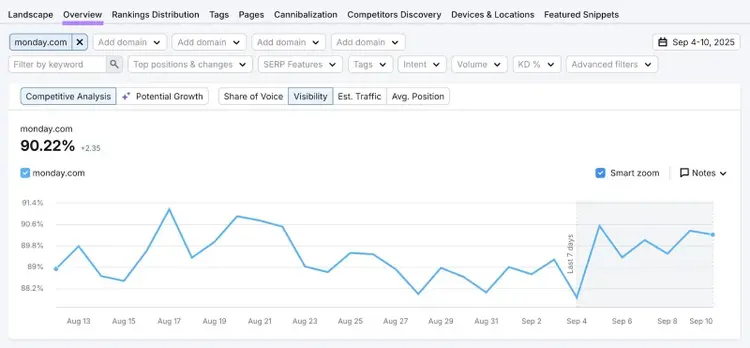
- Access key metrics: Review visibility, share of voice, estimated traffic, and ranking trends over time
Once you’ve set up keyword tracking, go to the “Overview” tab to view metrics for your tracked keywords.
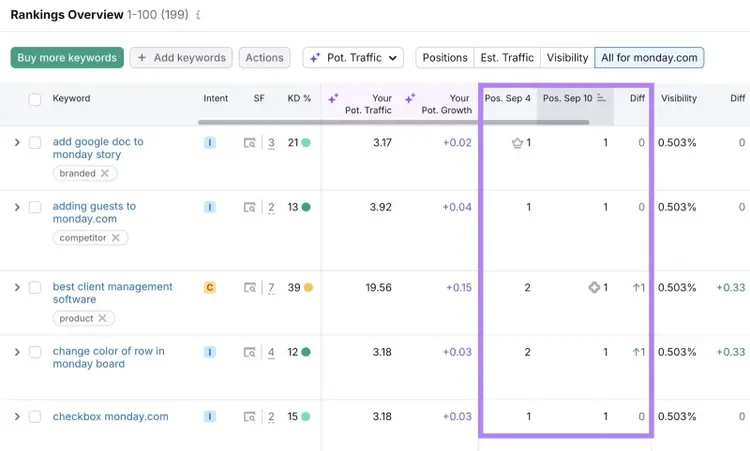
Scroll to the “Rankings Overview” section for a list of keywords, current rankings, and position changes over time.
To check if your site appears in Google’s AI Overviews, scroll back up, click “SERP features,” and select “AI Overview.”
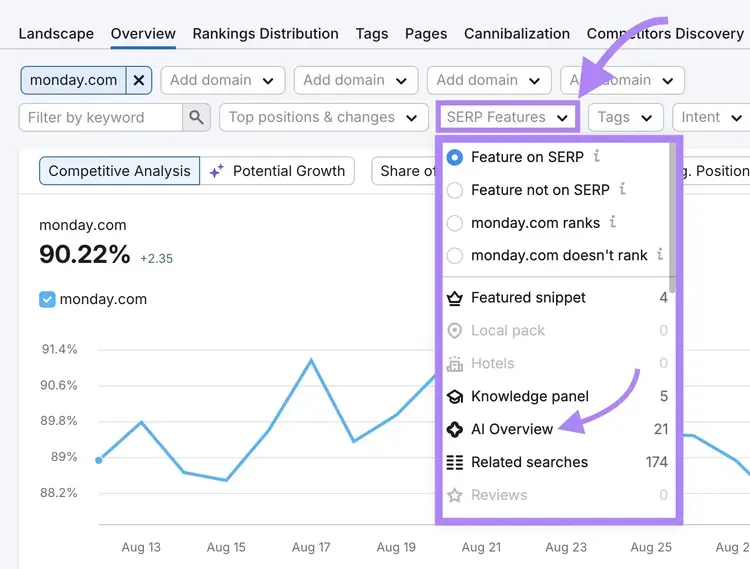
Try the Position Tracking tool today to monitor your homepage keyword rankings.
Track Your Homepage's Rankings
with the Position Tracking Tool

Cecilia is a senior editor and strategist with more than 12 years of experience shaping editorial strategies, refining brand messaging, and leading high-impact teams. She began her career in print and digital editorial leadership roles before transitioning to SEO and digital marketing, focusing on data-driven strategies. She‘s passionate about ensuring operational efficiency, upholding editorial standards, and mentoring writers to deliver top-quality, brand-aligned content.
Cecilia Meis
Cecilia is a senior editor and strategist with 12+ years of experience spanning print, digital, and SEO. She’s passionate about optimizing editorial processes, upholding quality standards, and mentoring writers to deliver brand-aligned content.

Tells Google to show you more from Semrush in AI, Search, and Discover.